Product details
PGGB: Your DAC Reimagined.
High-precision PCM and DSD processing, offline and in real-time. Compare features, check your system and choose a license.
Getting Started with PGGB.
-
What does PGGB do? Your DAC (digital-to-analog converter) turns digital audio into the signal your amplifier or headphones use. Upsampling is a key part of digital reconstruction in many DACs. PGGB performs this step on your computer before the audio reaches the DAC. It uses:
- The computer's processing resources for demanding audio calculations
- Upsampling algorithms designed to calculate the audio waveform accurately between the original samples
- A PCM noise shaper and DSD modulators that reduce quantization noise in the audible range
-
Is PGGB suitable for my DAC? The result depends
on the DAC and its playback mode. Good candidates accept high
sample rates or let you bypass internal oversampling:
- PCM NOS: resistor-ladder (R2R) DACs with a non-oversampling (NOS) mode, or other DACs whose oversampling filter can be turned off
- Pure DSD: DSD DACs with a pure DSD mode
- High-rate PCM and DSD: DACs supporting 705.6/768kHz+ or DSD256+
- See the full compatible DAC list or post on the AS forum
-
PCM or DSD? PCM (pulse-code modulation) and DSD
(Direct Stream Digital) are two ways to represent digital audio.
Use your DAC's design as a starting point:
- Pure 1-bit DSD path: choose the highest DSD rate supported by your DAC, player and connection
- Sigma-delta DAC without a pure DSD mode: start with the highest DSD rate supported by your playback path
- PCM/R2R DAC that converts DSD internally to lower-rate PCM: choose the highest PCM rate supported by your playback path
-
Which settings should I use? Start with the
defaults, then check these three areas:
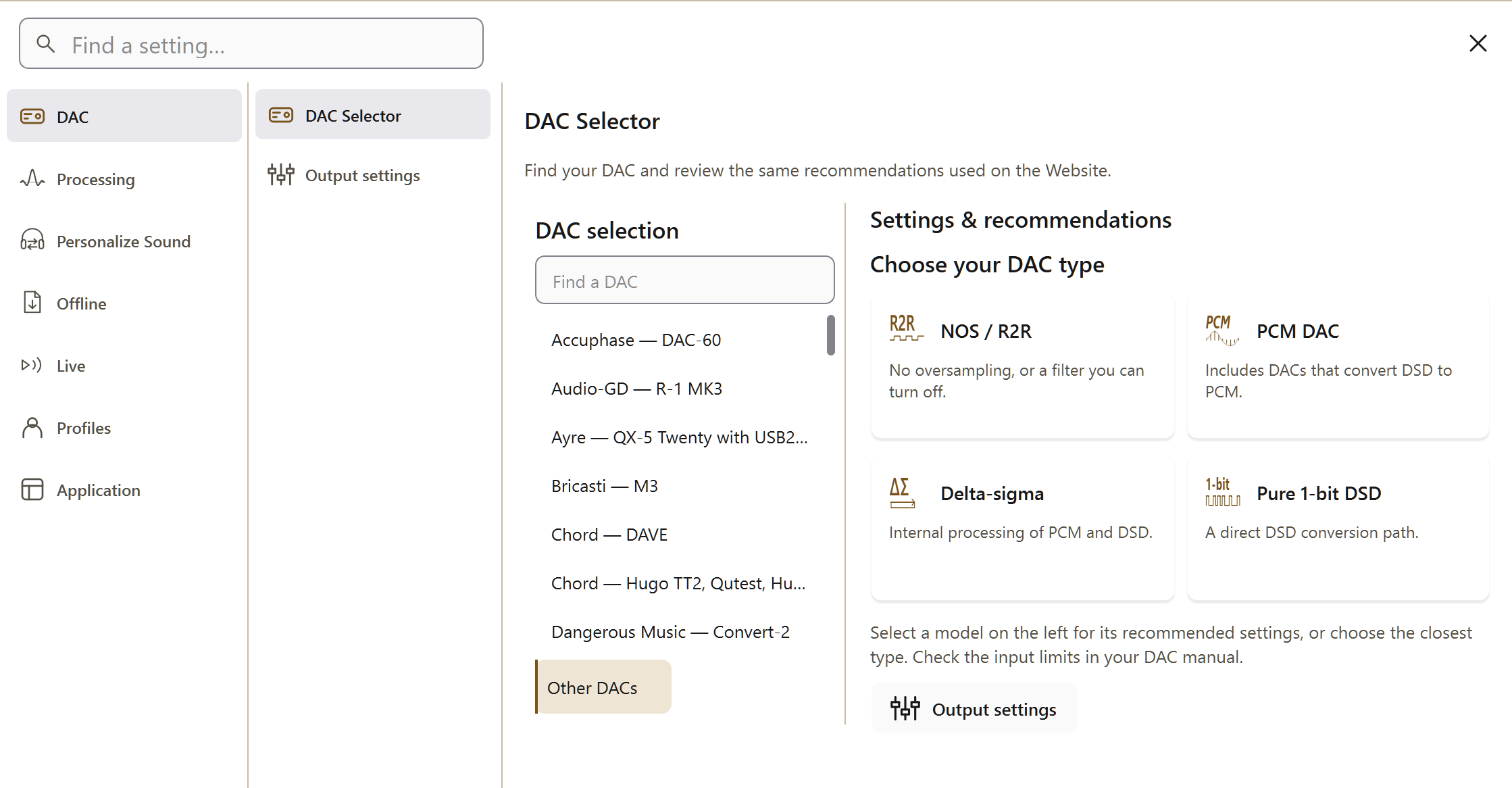
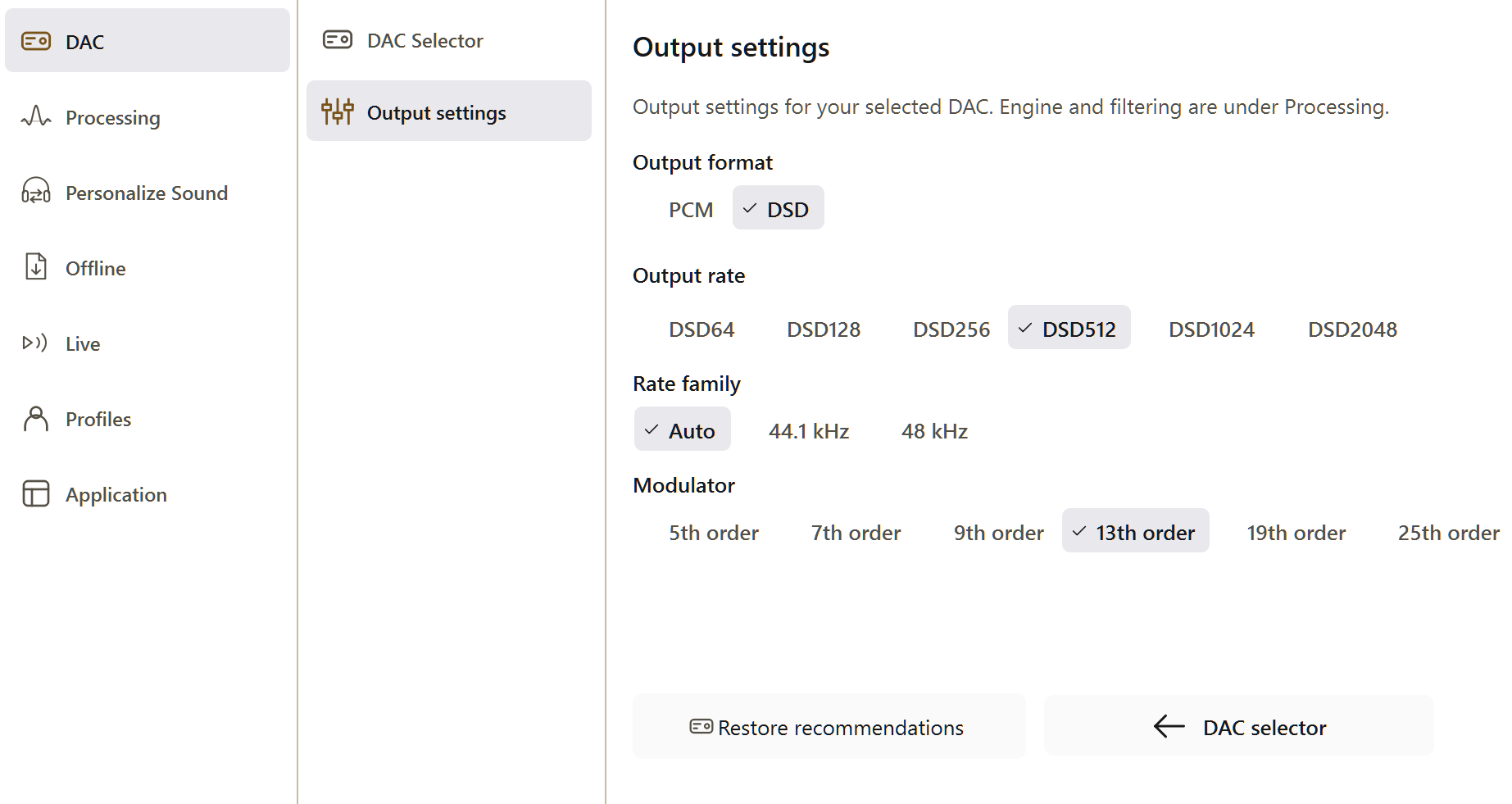
- Your DAC: use a built-in DAC preset when available. Otherwise, choose an output rate and PCM bit depth supported by the complete playback path. See the DSD quick start for DSD output. For PCM, start with the highest processing precision your tier supports without limits; reduce it if processing is too slow.
-
Your System:
- Memory and speed: leave Precision optimized selected under Settings → Processing to use the default Precision Optimized Upsampling Engine. It uses much less memory than the legacy engine. Processing speed depends mainly on CPU performance and the selected settings.
- Storage: Use the storage space calculator.
Legacy PGGB Engine.
Memory and speed settings that apply when Legacy is selected.
- Memory: the legacy engine is memory intensive. Configure paging on Mac or virtual memory on Windows so disk space can hold data that does not fit in RAM. For PCM, enable memory optimization. Use the disk space calculator to estimate the space needed.
-
Speed: under the Legacy engine, try two-stage conversion if single-stage DSD is too slow. For
legacy-engine paging on Windows,
disabling memory compression can reduce
compression overhead. Open PowerShell as
administrator and run
Disable-MMAgent -mc.
-
Your player: for files already
remastered by PGGB, disable additional digital signal
processing (DSP), including resampling and EQ. Use
bit-perfect playback, which passes the audio data
through unchanged. If you need software volume control,
see the guidance below.
- Roon: Does not support DSD rates above DSD512 or PCM above 768kHz. Set output to 44.1kHz rates for DSD.
- HQPlayer: Set 1x/Nx Filter and Dither to None. For DSD, set DirectSDM and enable 48k DSD under output.
- Volume: If using digital volume control, consider setting gain in PGGB instead.
- Or let PGGB be the player: PGGB-Live plays your files, or what your player sends it, directly to your DAC or network renderer.
Overview.
PGGB stands for Pan Galactic Gargle Blaster. The ‘Plus’ refers to support for both PCM and DSD.
PGGB converts audio to a higher or lower sample rate, a process called upsampling or downsampling. Its algorithms are designed for reconstruction accuracy close to the theoretical limit. It can also apply equalization (EQ) to adjust tonal balance, and it transfers common metadata tags and cover art to converted files. Output options include .wav, .dsf, .wv (WavPack) and .flac; supported rates are listed below.
PGGB uses high-precision calculations throughout resampling, noise shaping, DSD modulation and EQ. For PCM, choose 64-bit (Normal), 107 Bit (double-double), 128-bit quad precision (Insane) or 256-bit octuple precision (Ludicrous). This is the precision of the internal calculations, separate from the output file's bit depth. Higher precision improves numerical accuracy but takes longer to process. For DSD, PGGB selects the working precision automatically. Read more about the PGGB philosophy and DSD support.
PGGB has two processing engines. We recommend the default Precision Optimized Upsampling EngineNew for its speed and lower memory use. The earlier Nyquist-Shannon Engine remains available for whole-track processing. Read about the PGGB engine ↗
Nyquist-Shannon Engine.
The legacy engine considers the track as a whole. With high-frequency (HF) noise filtering disabled, it preserves the original samples and creates intermediate samples by time-shifting the original data. The approach is non-apodizing and aims to approach the reconstruction limit for the track's length and sample rate. For the mathematical background, compare it with windowed Whittaker-Shannon interpolation.
Conventional windowed sinc filters calculate output using a limited span of input samples. Longer filters can improve reconstruction accuracy, but they also increase processing demands. The legacy PGGB engine instead uses information from the full track.
As the sample rate and track length increase, the legacy engine approaches pure sinc interpolation. The aim is to preserve timing, detail and tonal character. Listeners describe improvements in depth, layering, transients and timbre; the audible result depends on the recording and playback system.
Precision Optimized Upsampling Engine.
Introduced in V9, the default engine is an efficient reformulation of the Nyquist-Shannon upsampling engine. It is a true breakthrough in both upsampling quality and processing speed. It builds a processing pipeline tailored to the selected precision and the input and output sample rates. Within the passband (the frequency range it preserves), reconstruction accuracy is limited by the selected precision. It uses much less RAM and is considerably faster than the legacy engine. Listeners describe more natural timbre, clearer instrumental separation and a deeper sense of space. Read about the PGGB engine ↗
Select Precision optimized under Settings → Processing to use the default engine. Legacy selects the Nyquist-Shannon engine, which requires more memory. Live requires Precision optimized, so Legacy is disabled. Your Offline engine choice returns when you switch back to Offline.
With Precision optimized selected, choose Optimal, Alternate or Minimal. Optimal is the default and the recommended starting point. Alternate keeps a slightly wider frequency range before rolling off. Both match reconstruction accuracy to PGGB’s internal calculation precision within the frequency range they preserve. Minimal applies the least high-frequency filtering and may allow more high-frequency distortion. Compare on familiar music and choose what you prefer; a wider bandwidth is not necessarily better.
The precision choices are unchanged: 64-bit (Normal), 107 Bit, 128-bit (Insane) and 256-bit (Ludicrous). See the guide for details.
PGGB-ARC.
PGGB-ARC (Anthropometric Room and Crossfeed) adjusts spatial presentation for headphone listening in PCM and DSD. Crossfeed blends a small, filtered part of each channel into the other, reflecting the way each ear hears both loudspeakers. Head measurements help tailor the effect, and an optional room effect adds reflections and reverberation for a sense of space. Crossfeed works during live and offline processing; the room effect is offline only. See the PGGB-ARC guide for recommended starting settings and explanations of each control.
For DSD source files, ARC requires the Precision optimized engine. PCM source files support ARC with either engine.
Simple to Use.
PGGB can upscale individual albums or an entire music library. Choose a preset for your DAC, or set a supported output rate and bit depth manually. Leave the remaining settings at their defaults for your first conversion.
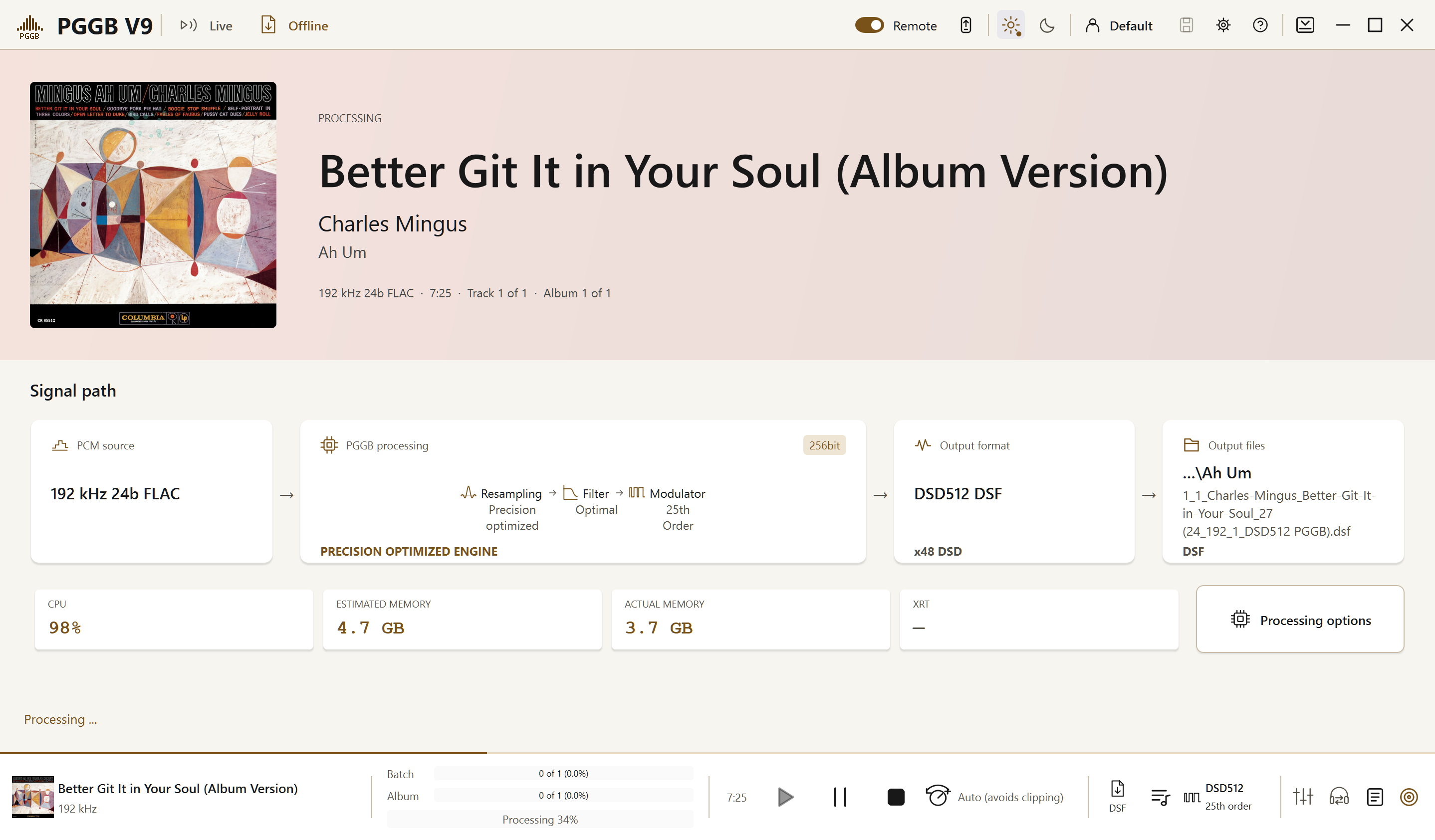
Select the input and output folders, or drag them into PGGB, then press Start. Use Pause or Stop as needed. You can add folders while processing continues. Create New creates a new album folder, Skip leaves previously processed tracks alone, and Overwrite replaces existing output tracks.
Customize to Suit Your Needs.
Use the controls to match PCM or DSD output to your playback system and listening preferences. Begin with the recommended defaults, then change one setting at a time so you can judge its effect.
Specifications & Features.
Below is a summary of PGGB's features. See the PGGB guide or contact us with questions.
Input Formats.
| File types | .wav, .flac, .aif, .aiff, .m4a, .dsf |
| Channels | Stereo (2-channel) |
| PCM rates | 44.1 kHz to DXD (352.8 kHz) |
| DSD rates | DSD64 to DSD2048 |
Output Formats.
| PCM files | .wav, .wav (RF64), .wv, .flac |
| DSD files | .dsf or .wv (WavPack) |
| PCM rates | Up to 3.072MHz |
| DSD rates | Up to DSD2048 |
| Direction | Upsampling and downsampling |
| Bit depths | 12- to 32-bit fixed-point, 64-bit floating-point |
High Precision.
| 64-bit | Normal |
| 107-bit | Chill |
| 128-bit | Insane |
| 256-bit | Ludicrous |
Processing precision is separate from output bit depth. Optimized math libraries were developed with ADVANPIX.
New in V9.
| Engine | Precision optimized upsampling, on by default Read about the PGGB engine ↗ |
| PGGB-Live | Real-time playback to a DAC or a network renderer (beta) |
| Live sources | Your files, another player through the PGGB Bridge, or UPnP |
| PGGB-Remote | Playback control from a browser on your local network |
| PGGB-ARC | Crossfeed and head measurements for PCM and DSD; room effect for offline processing |
| FLAC output | Compression now supported up to 768 kHz / 32 bits |
| Licensing | Self-service, with your email and an activation code |
Every V8 license works in V9. See What’s new in V9
DSD Reconstruction Accuracy.
Quantization noise (the error introduced when representing audio at the output bit depth) in the audible band
| DSD2048 | −300 to −800 dB |
| DSD1024 | −290 to −755 dB |
| DSD512 | −275 to −750 dB |
| DSD256 | −225 to −665 dB |
| DSD128 | −200 to −650 dB |
| DSD64 | −150 to −395 dB |
Ranges cover 5th- through 25th-order modulators. Six orders are available in three groups: Low Noise, Very Low Noise and Ultra Low Noise. These figures describe numerical processing, not the physical noise floor of a DAC. Full comparison
PCM Reconstruction Accuracy.
Numerical quantization-noise floor in the audible band, by processing precision. These figures do not describe the physical noise floor of a DAC.
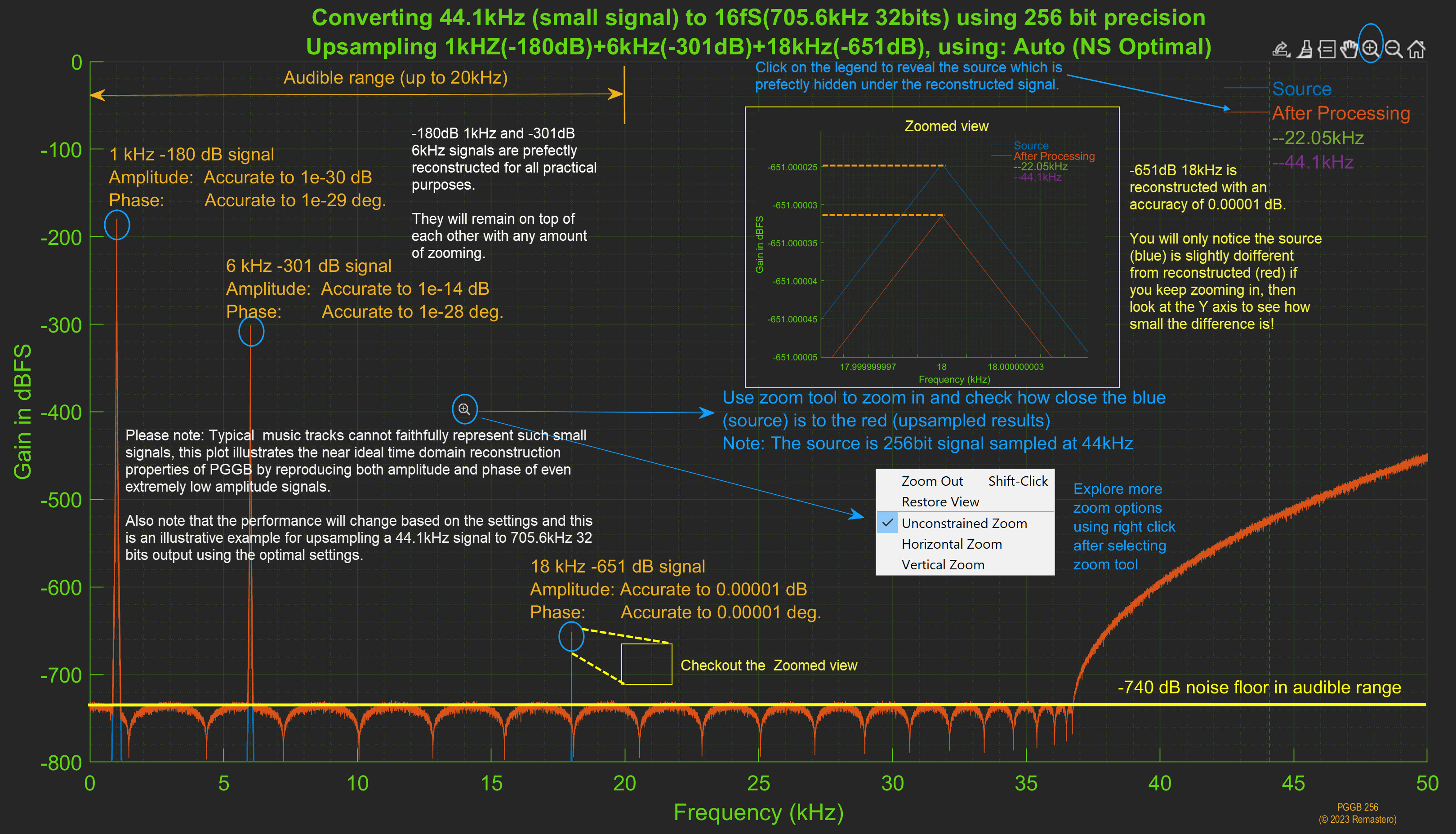
| 256-bit | −740 dB |
| 128-bit | −540 dB |
| 107-bit | −500 dB |
| 64-bit | −360 dB |
Small signal accuracy at 256-bit precision
| −301 dB signal | Amplitude error: 1e-14 dB; phase error: 1e-28 degrees |
| −651 dB signal | Amplitude error: 1e-5 dB; phase error: 1e-5 degrees |
Algorithms & Controls.
- DSD or PCM resampling modes
- Conversion within or between the 44.1 kHz and 48 kHz sample-rate families
- Adaptive noise shaper and DSD modulators
- Adaptive per-track algorithm optimization
- Inter-sample over detection
- ReplayGain normalization
- Parametric & convolution EQ (107–256 bit)
- High-frequency filters for noise from analog-to-digital conversion (ADC)
- Track trimming and silence adjustment
Other Features.
- Built-in DAC presets for many popular DACs
- Real-time CPU and memory tracking
- Batch process albums in multiple folders
- Combine continuous recording tracks
- Transfer of common metadata tags and cover art
- Multi-core parallel processing
- Dark and Light themes (follows system)
- Tooltips and built-in Help
- Plenty of HHGTTG references
PGGB-Live
PGGB-Live processes audio while you listen and sends it to a connected DAC or a network renderer (a device that receives audio over your network). Play local files, receive audio from another player through the PGGB Bridge, or use a UPnP source. Live processing supports EQ, DSD modulators and PGGB-ARC crossfeed. ARC's room effect is available only for offline processing.
PGGB-Live is in beta. If you encounter a problem, send a description of your setup and the session log to zb.pggb@gmail.com.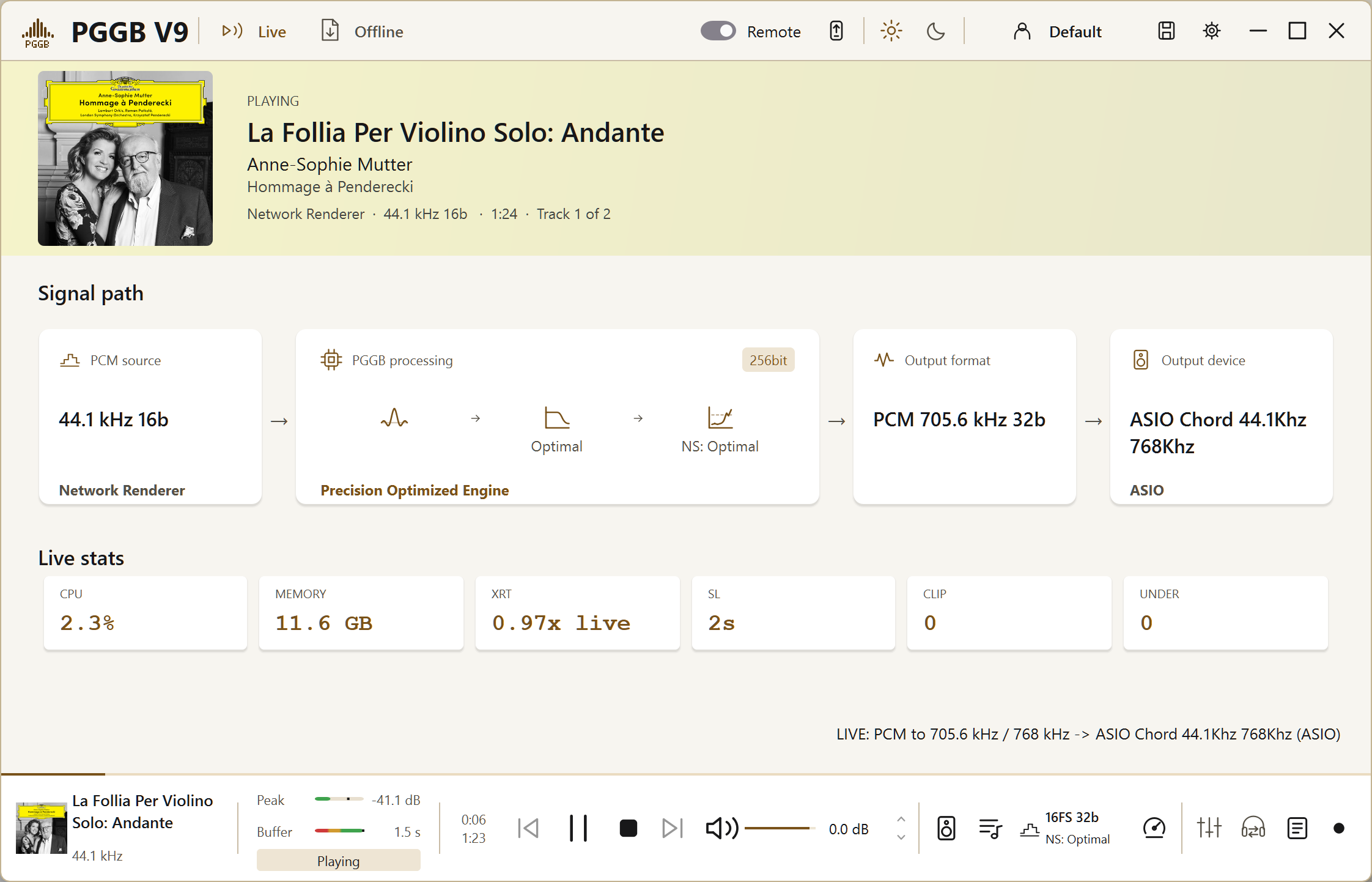
Play your own files.
- Queue up tracks, whole folders, or a playlist you saved earlier
- Plays .wav, .flac, .aif, .aiff, .m4a and .dsf
- Browse and queue from your phone as well, with PGGB-Remote
Receive audio from another player.
- From a compatible player on the same computer: select the PGGB Bridge as its output device. The Bridge passes the player's audio to PGGB-Live for processing. It appears as an ASIO device named PGGB-Live on Windows and as a Core Audio device on Mac.
- Over the network: PGGB appears as a UPnP renderer. Select it in a compatible UPnP control app to send music to PGGB-Live.
Where it plays.
| Windows | WASAPI (exclusive), ASIO, PAL, UPnP |
| Mac | Core Audio, PAL, UPnP |
| DSD | Native or DoP |
| DSD rates | DSD64 to DSD2048 |
For a local DAC or PAL endpoint, available rates depend on the device and the computer’s processing capacity. With a UPnP output, check the renderer’s supported rates yourself. Native DSD sends DSD directly; DoP (DSD over PCM) packages it in a PCM stream for transport without converting the audio to PCM. DoP uses more bandwidth and may offer a lower maximum DSD rate. Use Native when the DAC and driver support it. PAL is the preferred network endpoint; use UPnP when it is not available.
Output Modes.
| Bypass | Pass audio through with processing disabled |
| Bypass + Level | Apply volume control without resampling |
| PCM | Full PGGB processing to PCM |
| DSD | Full PGGB processing to DSD |
Calibration.
Calibration measures which output rates your computer can sustain in real time. The initial estimate takes a few seconds. A detailed measurement runs the first time you use a rate and can take a few minutes. Use Override limits to try a rate above the measured processing limit; it does not change the DAC's capabilities. If playback stutters, lower the rate. Run Calibrate again after changes that may affect processing speed.
Controls.
- Auto-play: detects an incoming stream and starts playback automatically.
- Apply live changes: applies changes from the Settings during playback. A short silence occurs while processing restarts with the new settings. Use it to compare settings on familiar music.
- Gapless stream: sends one continuous stream. Turn it off to send per-track names and artwork.
- Volume with clip protection: maintains a margin below digital full scale of −1 dB for PCM and −3 dB for DSD. The clip indicator and counter show when clipping is detected.
- Meters and log: level meters show audio level, and buffer meters show how much audio is ready to play. The session log records playback activity. Separate buffers handle network output and incoming audio from another player.
- PGGB-EQ and PGGB-ARC crossfeed apply to live playback. The ARC room section is offline only
PGGB-Remote.
PGGB-Remote is a web page hosted by PGGB on your local network. Open it in a browser on a phone, tablet or computer connected to the same network to control playback or Offline processing. No separate phone app is required. You can add it to your home screen for easier access. Using the Process view.
Add it to your home screen
Added this way, PGGB-Remote opens full screen with its own icon, without the browser address bar.
- iPhone and iPad: open the address in Safari. Tap the Share button (the square with the arrow), scroll down, tap Add to Home Screen, then Add.
- Android: open the address in Chrome. Tap the three-dot menu, then Add to Home screen or Install app, then Install.
Home-screen options vary by browser. You can also use PGGB-Remote directly in the browser without adding it to the home screen.

Controls.
- Now playing with artwork, track position, buffer and level meters
- Previous, Play/Pause, Stop and Next; volume, minimum and maximum levels, and mute
- Browse music folders on the computer running PGGB and queue a file or folder
- Switch between your DAC and a network renderer
- Open processing settings and apply changes as you would in the desktop application
- Session log, clip indicator, and light / dark / auto theme
Setup.
- Enabled by the Remote toggle in the header, on by default
-
Open
http://<the PGGB machine>:8180/in a browser on the same network, replacing the placeholder with the computer's address. Use Links to copy the complete address. - The Links button lists the address for each network interface and copies one when you click it
- If port 8180 is in use, PGGB tells you: 'Remote control is off: port 8180 is in use by another program'
- Options your license does not allow are shown grayed out, not hidden
See the PGGB-Live guide for setup, calibration, PGGB-Remote and troubleshooting.
System Requirements.
For DAC and player requirements, see DACs & Players. For memory and speed details, see the guide.
64-bit Windows 10 or 11, or macOS 12 Monterey or later. Apple Silicon and Intel Macs are supported. Intel and AMD processors must support AVX2. For Offline PCM up to 256-bit precision and DSD up to DSD256, start with a 4-core processor and 16 GB RAM. For DSD512, we recommend at least an 8-core processor and 24 GB RAM. DSD1024 and DSD2048 benefit from more cores and 32–64 GB RAM. A fast internal SSD helps with larger libraries. Your chosen settings and desired processing speed determine how much additional performance is useful.
Precision optimized upsampling (the default). With Precision optimized selected, memory use does not grow with track length and paging space is rarely needed. For Offline PCM up to 256-bit precision and DSD up to DSD256, start with a 4-core processor and 16 GB RAM. Read about the PGGB engine ↗
- PCM conversions: more processor cores can shorten processing time at all precisions from 64 to 256 bits. PGGB uses available cores when memory permits. Once there is enough RAM, a faster processor and faster RAM matter more than adding RAM for large batches.
- DSD conversions: the output rate and modulator choice (Low Noise, Very Low Noise or Ultra Low Noise) determine much of the processing load. An 8-core processor with 24 GB of RAM is a useful guideline for output up to DSD512. DSD1024 and DSD2048 benefit from more cores and 32–64 GB of RAM.
Selecting Legacy uses the legacy Nyquist-Shannon engine. It holds the whole track at the working precision, so longer tracks and higher DSD rates need more RAM or paging space. Paging uses temporary disk storage for data that does not fit in RAM.
If you turn Optimal HF Filtering off.
Requirements for whole-track processing on the Nyquist-Shannon engine.
- PCM conversions: for tracks under about 12 minutes, a 4-core processor with 16 GB of RAM and at least 128 GB of free SSD space for paging may be sufficient at 128-bit precision. Memory and paging requirements roughly double at 256-bit precision. For batches of tens or hundreds of albums, consider an 8-core processor, 64 GB of RAM and 512 GB of free paging space.
- DSD conversions: allow at least 32 GB of RAM and 512 GB of free paging space for output up to DSD512. Requirements roughly double for DSD1024. For large batches, a 16-core processor, 128 GB of RAM and 1 TB of free paging space provide a useful starting point.
Sustained processing needs adequate cooling so the CPU can maintain its performance, especially when overclocked or using turbo mode.
PGGB-Live. Use calibration to determine which rates your computer can sustain. Offline remastering at 1.25x real time or faster is a useful starting indication: 1.25x means processing 75 seconds of audio in 60 seconds. Live calibration checks performance for the selected settings. High DSD rates require more processing power.
Streaming limits also depend on your license tier. See
Compare licenses. On the Mac, Device
Input needs the PGGB Bridge driver from the
.pkg installer and audio-input (Microphone) permission.
PGGB can run on Linux in a Windows virtual machine with enough RAM and CPU cores allocated. For live playback, the virtual machine must have access to the audio device or a network renderer. We do not recommend a virtual machine for PGGB-Live.
Note: PGGB requires Internet access during installation and for the trial version. It also needs internet access for activation and license management. PGGB-Live needs network access for remote control and network rendering. On first run, PGGB may request firewall permission. We do not use or share your personal information.
DACs & Playback Software.
Choosing a DAC and Playback Mode.
- High-rate PCM and DSD: DACs accepting 705.6/768 kHz or above, or DSD256 or above, are good candidates for PGGB.
- PCM NOS: use non-oversampling mode or bypass the internal oversampling filter where available, so PGGB handles that processing.
- Pure DSD: use the DAC's pure DSD mode where available to minimize additional digital processing.
- DACs supporting up to DXD and DSD128: try converting CD-quality audio to DXD (352.8 kHz) or DSD128 and compare the results.
- PCM-only DACs: Use PGGB to remaster DSD to the highest supported PCM rate.
- 96kHz/192kHz DACs: Use PGGB to remaster DSD or DXD to supported rates.
User-Reported Compatible DACs.
These models and settings have been reported by users. Supported rates can vary with the model, input connection and driver. Check your playback path before selecting a rate.
- Chord DAVE, Hugo TT2, Qutest, Hugo2, Mojo, Mojo 2 (16fS*/32-bit or 24-bit via DBNC/SRC.DX). Some users prefer DAVE with DSD+ filter and DSD512.
- T+A SD 3100 HV, SDV 3100 HV, DAC 200 (DSD512, DSD1024 or 16fS/32-bit with NOS2)
- Denafrips Terminator-Plus, Terminator (DSD512, DSD1024 or 32fS/20-bit**)
- Holo Audio May DAC, Spring 3 (up to DSD2048 or 16fS/20-bit** or 32fS/16-bit***)
- MSB Select/Reference with Pro ISL (DSD256, DSD512 or 16fS/32-bit) and Digital Director
- Vinnie Rossi L2 DAC in NOS mode (DSD512 or 16fS/32-bit)
- iFi Pro iDSD (DSD512, 16fS/32-bit)
- dCS DACs (DSD128, 8fS/24-bit)
- Gustard X26 Pro ESS 9038 Pro NOS (DSD512, 16fS/32-bit)
- Ayre QX-5 Twenty USB2 (DSD256, DSD512, 16fS/32-bit)
- Topping D90, D50 (DSD512, 16fS/32-bit)
- Playback Designs MPD-8, MPS-8 (DSD256)
- Dangerous Music Convert‑2 (4fS, 24-bit with noise shaping)
Additional models to try; user feedback is welcome:
- Denafrips Ares II, Pontus II, Venus II (DSD512, DSD1024, 32fS/20-bit**)
* fS is the base sample rate: 44.1 kHz
or 48 kHz. For example, 16fS is 705.6 kHz or 768 kHz.
** The suggested 19- or 20-bit output setting targets the DAC's most
linear operating range.
*** The USB driver may limit playback to 16 bits at 32fS rates.
Playback Software & Servers.
For files already remastered by PGGB, use bit-perfect playback: disable additional resampling, EQ, dither and bit-depth conversion. If you need adjustable software volume, follow the Software Volume Control guidance below. Otherwise, use a suitable volume control elsewhere in your system.
- XDMS and Roon for Taiko SGM Extreme (choose PCM: Wav (XDMS) under Settings → Offline → Output files)
- Innuos Server: Up to DSD512 and 16fS PCM with Sense and Roon
- Antipodes: Up to 16fS and DSD512 with Squeeze, HQPlayer, Roon, MPD
- HQPlayer Desktop/Embedded: Set 1x/Nx filter to 'None', dither 'None', volume 0dB. For DSD: DirectSDM, enable 48k DSD
- Roon: Disable Headroom, sample rate conversion, and DSP. Fixed volume. Does not support 48k DSD rates — set PGGB to always output 44.1kHz DSD
- Chord Poly: Up to 8fS with Roon, 16fS with MPD from SD card
- JRiver Media Center
- Audirvana: Up to DSD512 and 16fS PCM
Using PGGB-Live as the Player
PGGB-Live includes a basic player for local files. If you prefer the library browsing or streaming features of your existing player, send its output through the PGGB Bridge. The player must support the Bridge's audio interface. Alternatively, use a compatible UPnP control app to select PGGB as a network renderer.
For Bridge input, select the PGGB-Live device in the source player . Turn off additional resampling, EQ, dither and volume adjustment in that player if PGGB-Live is handling the processing and level control.
For files you have already remastered, use your usual player with bit-perfect output or select Bypass mode in PGGB-Live.
Software Volume Control.
If you need adjustable software volume when playing remastered PCM files, choose an output format suitable for further processing:
- 64-bit PCM: save output as 64-bit floating-point audio, which creates larger files but preserves more precision for later adjustment. Apply volume control in a compatible player, then output at the required bit depth using the player's noise shaping or dither.
- 32-bit PCM: enable noise shaping in PGGB and save 32-bit output. Apply volume control in the player, then use its noise shaping or dither when reducing to the final output bit depth.
Licensing & Pricing.
Choose a Plus, Pro or Max license below. After payment, your activation code will arrive within a few minutes at the email address you use for PayPal. If you do not see it, check your spam folder. The sender is PGGB Licenses (zb.pggb@gmail.com). See Activating your license for the setup steps.
Without a valid license, PGGB runs in trial mode for 30 days then converts to Lite. Contact us if you have trouble running PGGB or need to extend your trial.
Already have a V8 license? It works in V9 as it is. There is nothing to request and nothing to pay.In V9, use your registered email address and activation code to activate a license or move it to another computer. See Activating your license for the steps.
Compare Tiers at a Glance.
PCM bit counts below refer to processing precision, not output bit depth. The PCM and DSD conversion rows describe offline processing; the PGGB-Live row describes live playback limits.
|
Limited Trial
Free
|
Lite
Free
|
Plus
$350
|
Pro
$650
|
Max
$1050
|
|
|---|---|---|---|---|---|
| PCM precision up to 107 bits | Unlimited | Unlimited | Unlimited | Unlimited | Unlimited |
| PCM precision: 128 bits | 2 tracks | Unlimited | Unlimited | Unlimited | |
| PCM precision: 256 bits | 2 tracks | 2 tracks | Unlimited | Unlimited | |
| DSD64–DSD256 | 2 tracks | Unlimited | Unlimited | Unlimited | |
| DSD512–DSD2048 | 2 tracks | 2 tracks | 2 tracks | Unlimited | |
| PGGB-Live streaming | Unlimited at 107-bit PCM † | Unlimited at 107-bit PCM † | Unlimited to 128-bit PCM and DSD256 † | Unlimited PCM and DSD to DSD256 † | Unlimited |
| Additional Live license | Included | Included | |||
| Installs | PC/Mac | PC/Mac | 1 PC/Mac | 1 PC/Mac | 1 PC/Mac |
| License validity | 30 days | Perpetual | Perpetual | Perpetual | Perpetual |
| Support | Forum/Email | Forum | Forum/Email | Forum/Email | Forum/Email |
| Free upgrades | — | — | 1 year* | 1 year* | 1 year* |
| Commercial use | |||||
| Download | Automatic | Buy $350 | Buy $650 | Buy $1050 |
* If no major update is released in the first year, free upgrades
continue through the next major version.
† Playback within your tier's range has no time limit. Higher
settings are available for 30 minutes of playback per application
session. Pausing and playing within your tier's range do not use
this allowance. When it is exhausted, PGGB displays a license-limit
message and stops the stream. Select settings within your tier's
range or restart PGGB to begin another 30-minute session.
The Live License Included With Pro and Max.
Pro and Max each include a second license at no cost: a Live license at the same level. It covers PGGB-Live only, with no offline processing. Use it on a second machine, such as the one connected to your system.
The Live license is added to your account with the main license and is not sold separately. To use it, install PGGB on the second computer, register with the same email address and activation code, and select the Live license from the list.
The offline Start button remains disabled on the computer using the Live license. Live playback follows the limits of the corresponding Pro or Max tier and includes Settings, PGGB-Remote, calibration, EQ and PGGB-ARC crossfeed.
Why Upgrade to V9?
The table compares V7 with V9. V8 users can install V9 with their existing license at no extra cost. Performance figures depend on the computer, source files and processing settings.
| Feature |
V7
|
V9
New
|
|---|---|---|
| Platform support | Windows, Intel Mac, Apple Silicon (Rosetta) | Windows, Intel Mac, Apple Silicon (native) |
| Speed enhancements (PCM, DSD) | — | Hardware accelerated pipeline |
| Apple Silicon performance | Rosetta (emulated) | Native — 5–10x faster |
| PCM 256-bit speed | Baseline | 3–4x faster, uses 25% less RAM |
| DSD speed | Baseline | 10–30% improvement |
| Quality improvements (DSD) | — | New modulators improve reconstruction accuracy |
| DSD modulators | 5th–9th order* | 5th–25th order, for all rates |
| Quantization noise** | −400dB to −500dB | −600dB to −800dB |
| DSD rates | DSD128–DSD2048 | DSD64–DSD2048 |
| Real-time playback | — | PGGB-Live plays to your DAC or network renderer |
| Sources | — | Your files, Device Input through the PGGB Bridge, or a UPnP network stream |
| Outputs | — | WASAPI and ASIO on Windows; Core Audio on Mac. PAL for network output, with UPnP as the fallback. |
| Output modes | — | Bypass, Bypass + Level, PCM, or DSD (Native or DoP) |
| Phone and tablet control | — | PGGB-Remote, a web page served on your network |
| Spatial sound for headphones | — | PGGB-ARC, PCM and DSD |
| Crossfeed | — | Off, Mild, Medium or Strong, with speaker angle and brightness compensation |
| Anthropometry | — | Head size, head circumference, ear-canal-to-shoulder height |
| Room | — | Studio, Living Room or Concert Hall. Offline only |
| Default processing engine | Legacy processing engine | Precision Optimized Upsampling Engine on by default, with Filter Choice Read about the PGGB engine ↗ |
| Memory and speed | RAM intensive, speed tied to paging | Lower memory use; speed depends mainly on CPU performance and selected settings |
| Moving to a new computer | Email us for a deactivation code | Self-service, using your email and activation code |
| Upgrade Now |
Buy.
Choose your license, check upgrade eligibility and review the total on the purchase page.
All sales are final, no refunds once a license has been generated. Please use the trial to fully evaluate PGGB before purchasing.
Getting PGGB.
PGGB-Audio-Link (PAL) downloads
Install the endpoint on the computer connected to your DAC. Choose its operating system and processor below.
Debian, Ubuntu and Raspberry Pi OS
Install or update from a terminal
Choose your processor. Run both commands in the same folder on the computer connected to your DAC. They install PAL or update an existing installation.
Intel / AMD 64-bit (.deb)
curl -L -O https://github.com/remastero/pggb-downloads/releases/latest/download/pggb-audio-link_amd64.deb
sudo apt install ./pggb-audio-link_amd64.deb
ARM64 (.deb)
curl -L -O https://github.com/remastero/pggb-downloads/releases/latest/download/pggb-audio-link_arm64.deb
sudo apt install ./pggb-audio-link_arm64.deb
Fedora and other RPM systems
Install or update from a terminal
Choose your processor. Run both commands in the same folder on the computer connected to your DAC. They install PAL or update an existing installation.
Intel / AMD 64-bit (.rpm)
curl -L -O https://github.com/remastero/pggb-downloads/releases/latest/download/pggb-audio-link.x86_64.rpm
sudo dnf install ./pggb-audio-link.x86_64.rpm
ARM64 (.rpm)
curl -L -O https://github.com/remastero/pggb-downloads/releases/latest/download/pggb-audio-link.aarch64.rpm
sudo dnf install ./pggb-audio-link.aarch64.rpm
Arch Linux
Install or update from a terminal
Choose your processor. Run both commands in the same folder on the computer connected to your DAC. They install PAL or update an existing installation.
Intel / AMD 64-bit (.pkg.tar.zst)
curl -L -O https://github.com/remastero/pggb-downloads/releases/latest/download/pggb-audio-link-x86_64.pkg.tar.zst
sudo pacman -U ./pggb-audio-link-x86_64.pkg.tar.zst
ARM64 (.pkg.tar.zst)
curl -L -O https://github.com/remastero/pggb-downloads/releases/latest/download/pggb-audio-link-aarch64.pkg.tar.zst
sudo pacman -U ./pggb-audio-link-aarch64.pkg.tar.zst
PAL OS 9.1.42 for Raspberry Pi 5
Write the card and connect your DAC ↗Use the installation page to download PGGB for Windows or Mac, follow the setup steps, and activate or manage your license.
So long and thanks for all the fish
.·´¯·.´¯·.¸.ZB.´¯·.¸¸.·´¯·.¸><(((º>