The technical background
Understanding PGGB.
"In the beginning the Universe was created. This has made a lot of people very angry and been widely regarded as a bad move."
Explore reconstruction, PCM and DSD processing, noise shaping and the choices that affect your system.
Understanding PGGB.
The PGGB Philosophy (Three Pronged Approach).
Both of PGGB's processing engines follow the approach described here. They differ in how the work is arranged. The Nyquist-Shannon engine holds the whole track in memory at working precision, which is why it asks so much of your computer. The Precision Optimized Upsampling Engine, the default since V9, reaches the same reconstruction with a pipeline built for the precision and the sample rates you chose, so it needs far less memory. Read about the PGGB engine ↗
PGGB DSD and PGGB PCM resampling is built on the same principles:
- Algorithm: PGGB maximizes reconstruction accuracy by utilizing all information in the source track and upsampling to the required output rate. For PCM, the maximum output rate was up to 64fS. In the case of DSD, the maximum output rate can be 128fS, 256fS, 512fS, 1024fS, or 2048fS. Therefore, the upsampling algorithms remain the same for both PCM and DSD, but the output rate for DSD is significantly higher.
-
Precision: PGGB uses high precision to maximize reconstruction accuracy. For PCM, it supports 64-, 107-, 128- and 256-bit precision. Higher precision helps improve reconstruction accuracy in the audible range. At a given precision, output bit depth and sample rate also limit that accuracy. For PCM output above 16 bits and sample rates above 8fS, 256-bit precision helps deliver the highest reconstruction accuracy in the audible range.
DSD uses 1-bit samples, so the amount of information retained in the audible range depends on the DSD rate and modulator order. Higher-order modulators reduce quantization noise more aggressively, while higher DSD rates provide more bandwidth into which noise can be shifted. The working precision therefore depends on both the output sample rate and the modulator order. Higher precision is useful only if the output can retain the additional information. PGGB selects precision adaptively for DSD, using between 107 and 256 bits according to the DSD rate and modulator. - Modulators and Noise Shapers: PGGB minimizing the quantization noise in audible range. In the case of PGGB PCM, PGGB uses noise shapers to keep the quantization noise in the audible range as low as possible. The noise floor is limited by the precision used for computing and also the quality of the noise shaper. For 64bit precision, the limit is about -320dB. If a noise shaper is capable of achieving a quantization noise floor that is lower than -320dB for the given bit depth and sample rate, then it makes to go for higher precision which is 128bit. The limit for noise floor for 128bit (quad precision) is about -690dB. If this noise floor can be breached, only then does 256bit computing makes sense. For PCM, the noise shapers PGGB uses can achieve a quantization noise floor as low as -750dB in the audible range, which is why PGGB provides the option of 256bit precision. For PGGB DSD, for all rates, the -320dB limit for 64bit computing is easily breached, which justifies the use of a minimum of 107bit precision. For DSD512 or higher rates with higher order modulators, the quantization noise in the audible band can be -750dB or lower, which is why we use precisions as high as 256 bits. The PGGB DSD modulator precision and order are both adaptive.
There is a *cheesy* cake analogy we like:
- Algorithm: Determines the quality of the cake by evaluating the reconstruction algorithms and predicting intermediate samples.
- Precision: Represents the fine/preciseness in reconstructing. It's like the icing on the cake; if the cake is bad, a good icing does no good!
- Noise shaping/Modulators: Decides how much of the icing (precision) you get to keep.
Additionally, since not all DACs/Players support 48k DSD rates, an inter-rate conversion option has been added. This allows conversion of a 48kHz/96kHz/192kHz source track to DSD rates that are multiples of 44.1kHz. This conversion is done transparently, PCM conversions will also benefit from this, especially for DACs capped at a maximum 44.1kHz rate.
PGGB and DSD.
Though PGGB started as a PCM only remastering tool, we knew all along that the same principles can be applied to upsampling to DSD too. The higher DSD rates (typically DSD128 or more) allow for higher reconstruction accuracy than PCM as it allows us to add even more intermediate samples at a higher accuracy than the DAC can in comparison to PCM. DSD also passes through some DACs with less processing than PCM and in the case of DACs that support pure DSD, they pass untouched all the way till analog conversion. Which is why we have been working on DSD upsampling algorithms for a while now.
Then why did PGGB not include DSD upsampling from the beginning?
There are multiple reasons for this:
- Need for efficient upsampling algorithms: While the highest PCM rates DACs accepts are limited to 16 or 32 times the base sampling rate (768kHz or 1.536MHz), DSD rates can be 32 to 64 times higher than the highest PCM rates a DAC can accept. Scaling PGGB algorithms to take the same no compromise approach and extending it to DSD rates was challenging both in terms of processing time and memory requirements.
- Very high quantization noise associated with single bit DSD: PGGB aims to achieve a very high time domain reconstruction accuracy and also small signal accuracy in the audible range. This is important for transient reproduction and conveying depth and realism. While with PGGB we have achieved this with PCM upsampling, designing DSD modulators that could deliver the same level of small signal accuracy and keep the quantization noise in the audible range below -300dB required significant research.
With optimization of reconstruction algorithms to scale to DSD rates, and after developing high precision modulators that are capable of maintaining a very high small signal amplitude and phase accuracy, we finally felt comfortable releasing PGGB that is capable of DSD upsampling.
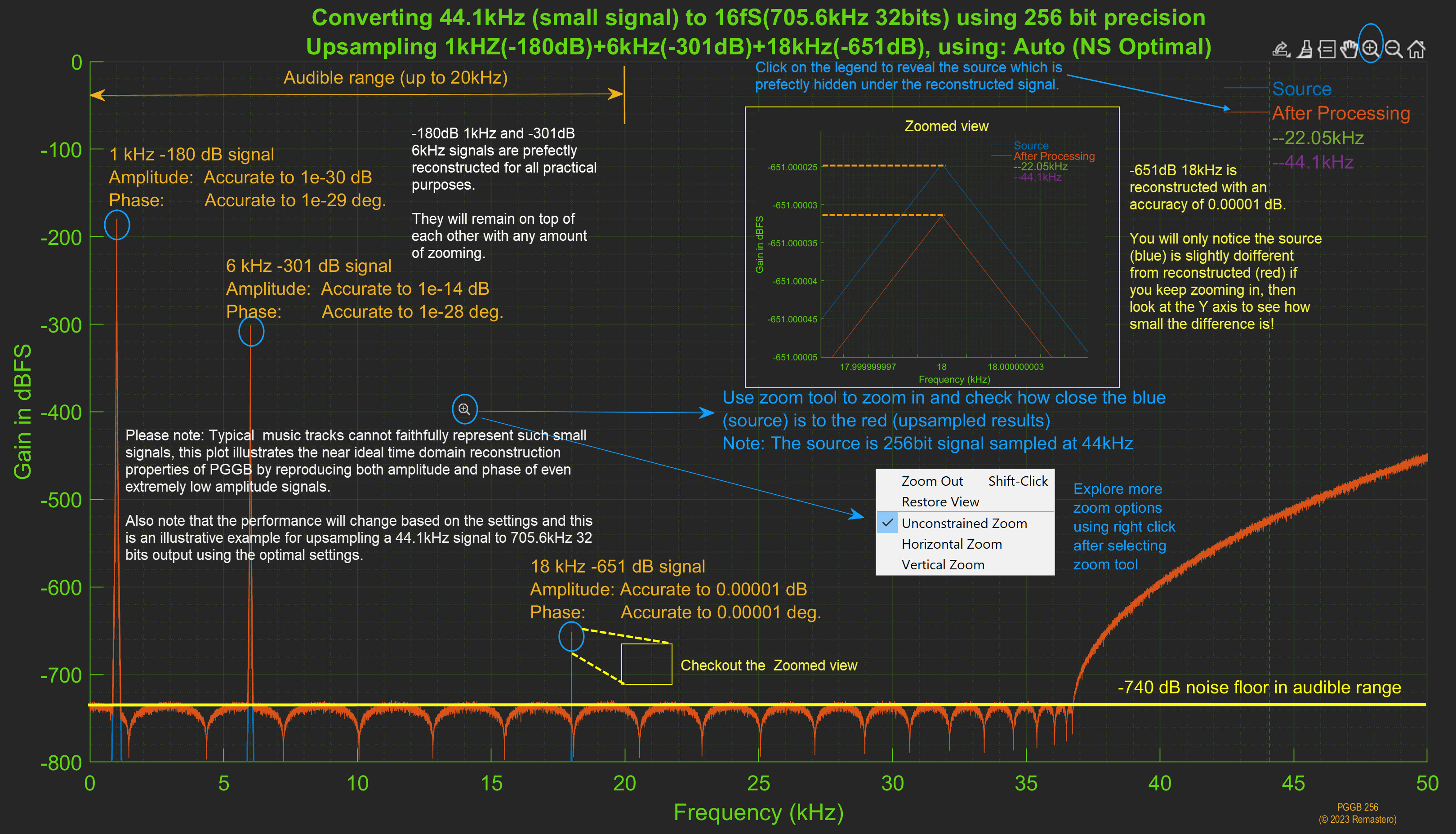
NS performance.
Here is an annotated example of noise shaper performance
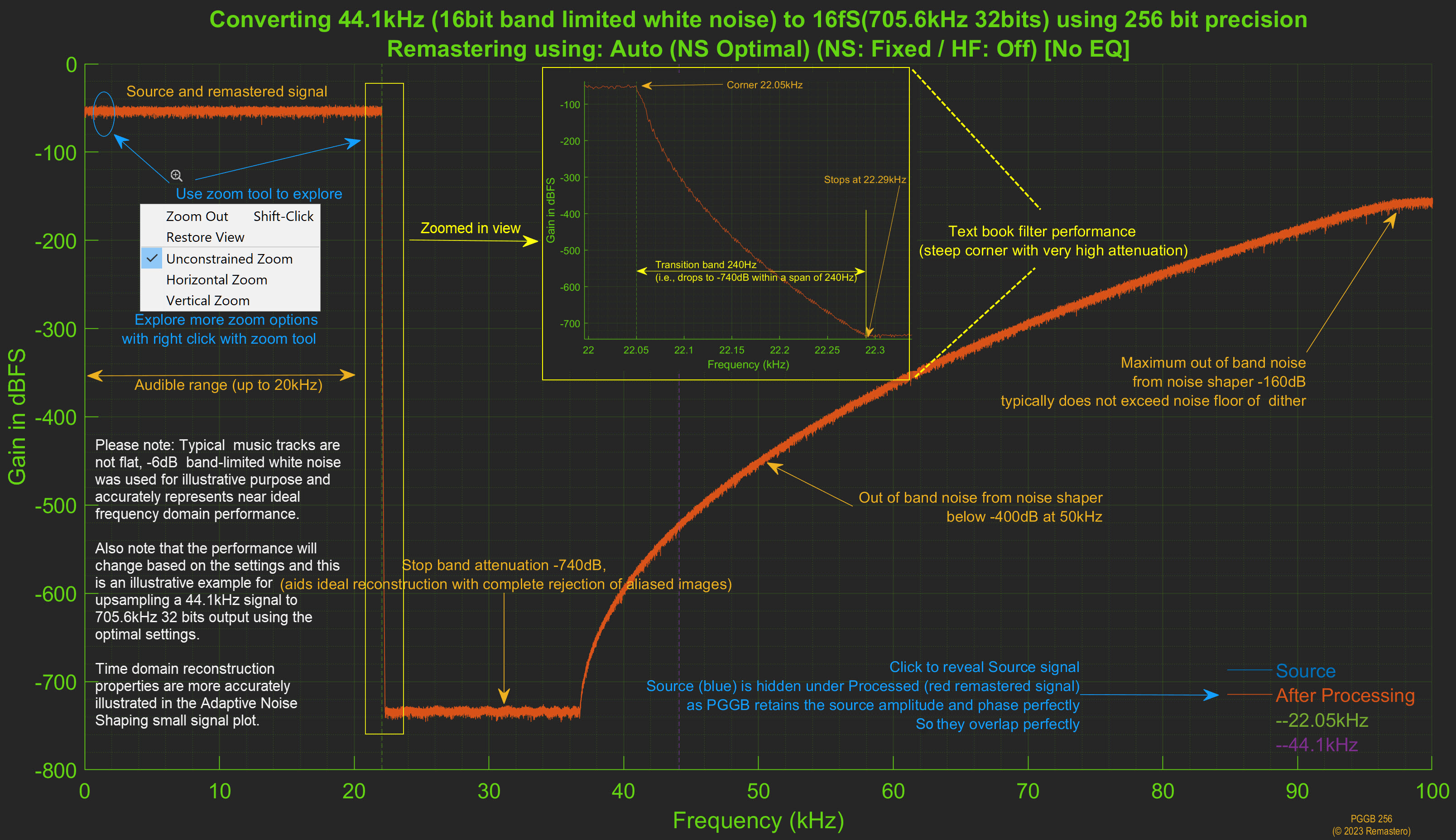
Upsampling Performance.
Here is an annotated example of upsampling performance of 1fS CD rate test signal
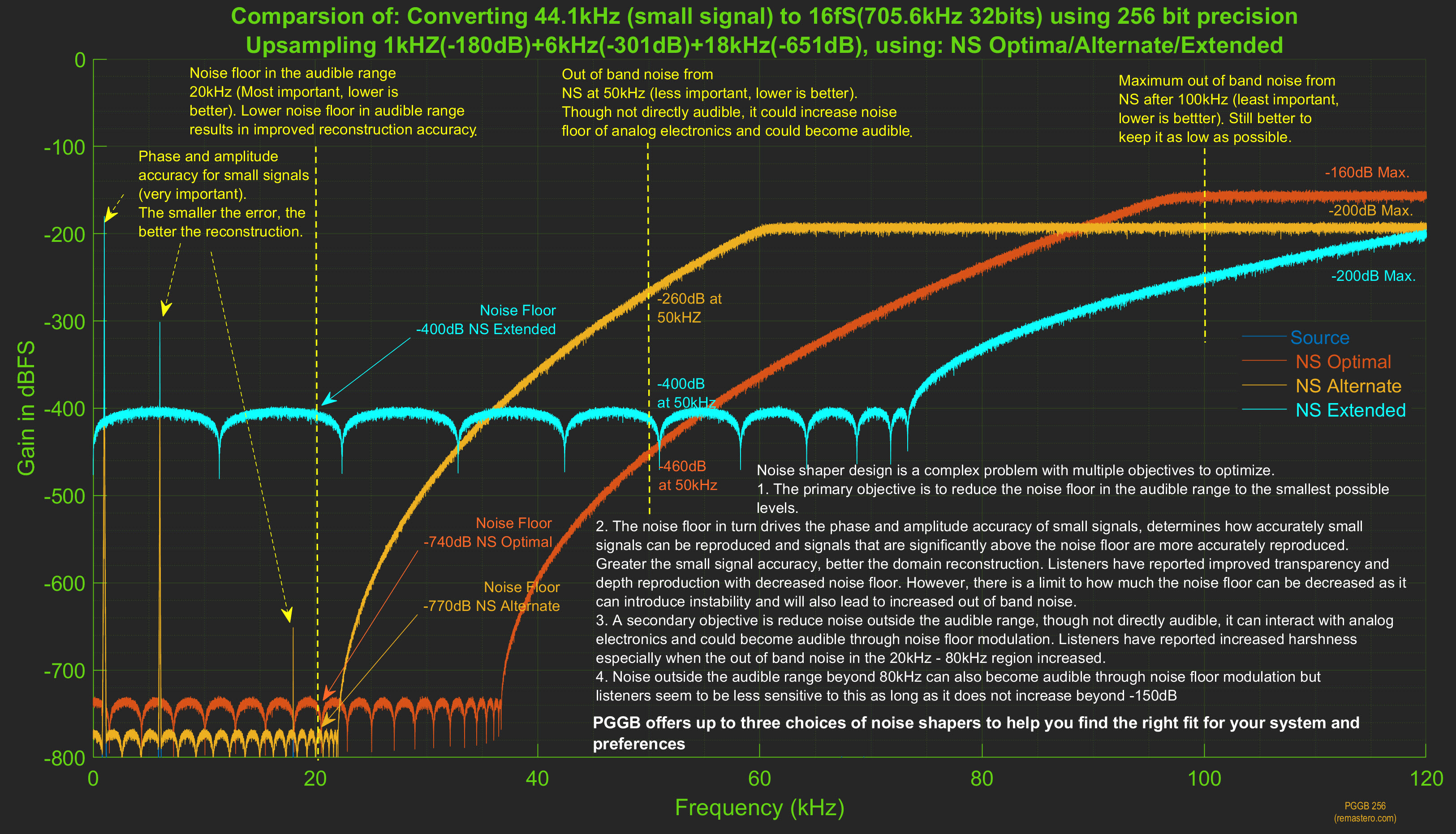
NS options.
Here is an annotated example comparing the different noise shaper options
DSD Modulator Performance.
PGGB provides three groups of DSD modulators across all supported rates (DSD64 through DSD2048):
- Low Noise (5th, 7th, 9th order): quantization noise in the audible band between −150dB and −465dB
- Very Low Noise (13th, 19th order): quantization noise in the audible band between −160dB and −620dB
- Ultra Low Noise (25th order): quantization noise in the audible band between −150dB and −800dB
The 19th order modulator is not available for DSD64. All other modulators are available for all rates. The modulators are rate adaptive, i.e., optimized for a given rate to achieve the lowest quantization noise in the audible range while keeping the slope of the noise profile gentle. The Very Low Noise and Ultra Low Noise modulators use a new modulator structure and the order is also adaptive. The order shown is the highest order possible.
To help you compare, we present the modulator performance in two forms: 1. By DSD rate: all modulators available for a given rate, and 2. By modulator order: how a given order performs across different rates.
Summary: Noise Floor by Rate and Modulator Order (dBFS)
| DSD Rate | 5th | 7th | 9th | 13th | 19th | 25th |
|---|---|---|---|---|---|---|
| DSD64 | −220 to −150 | −275 to −170 | −320 to −175 | −410 to −160 | — | −395 to −150 |
| DSD128 | −240 to −200 | −290 to −210 | −340 to −240 | −490 to −260 | −580 to −280 | −650 to −290 |
| DSD256 | −270 to −225 | −310 to −270 | −355 to −290 | −510 to −360 | −600 to −400 | −665 to −450 |
| DSD512 | −275 | −340 | −390 | −525 | −620 | −750 |
| DSD1024 | −290 | −360 | −425 | −560 | −620 | −755 |
| DSD2048 | −300 | −370 | −465 | −560 | −620 | −800 |
Values represent quantization noise floor in the audible band (dBFS). Where a range is shown, the lower value is the noise floor at lower frequencies and the upper value is near 20kHz.
DSD Modulator Performance by DSD Rate.
Below we describe the small signal performance for all DSD modulators available for a given DSD rate. Higher order modulators have lower noise floor in the audible range compared to lower order modulators for the same rate, but take slightly longer to process and have a steeper slope. It is recommended to start with the default Very Low Noise modulator and adjust from there.
Modulators for DSD64
DSD64 is new in V8. Five modulator orders are available: 5th, 7th, 9th, 13th, and 25th (19th order is not available for DSD64). At this lowest DSD rate, the noise floor range is wider. Lower frequencies benefit more from higher order modulators while the noise floor near 20kHz is limited by the rate itself.
| Order | Group | Noise Floor (dBFS) |
|---|---|---|
| 5th | Low Noise | −220 to −150 |
| 7th | Low Noise | −275 to −170 |
| 9th | Low Noise | −320 to −175 |
| 13th | Very Low Noise | −410 to −160 |
| 25th | Ultra Low Noise | −395 to −150 |
Figures will be updated soon.
Modulators for DSD128
All six modulator orders are available for DSD128. The noise floor improves significantly with each step up in order, with the 25th order Ultra Low Noise modulator achieving −650dB at lower frequencies.
| Order | Group | Noise Floor (dBFS) |
|---|---|---|
| 5th | Low Noise | −240 to −200 |
| 7th | Low Noise | −290 to −210 |
| 9th | Low Noise | −340 to −240 |
| 13th | Very Low Noise | −490 to −260 |
| 19th | Very Low Noise | −580 to −280 |
| 25th | Ultra Low Noise | −650 to −290 |
Figures will be updated soon.
Modulators for DSD256
All six modulator orders are available for DSD256. The higher rate allows more aggressive noise shaping, and the 25th order modulator achieves −665dB at lower frequencies.
| Order | Group | Noise Floor (dBFS) |
|---|---|---|
| 5th | Low Noise | −270 to −225 |
| 7th | Low Noise | −310 to −270 |
| 9th | Low Noise | −355 to −290 |
| 13th | Very Low Noise | −510 to −360 |
| 19th | Very Low Noise | −600 to −400 |
| 25th | Ultra Low Noise | −665 to −450 |
Figures will be updated soon.
Modulators for DSD512
All six modulator orders are available for DSD512. At DSD512 and above, the noise floor becomes uniform across the audible band (lower and upper values converge). The 25th order Ultra Low Noise modulator achieves a remarkable −750dB noise floor.
| Order | Group | Noise Floor (dBFS) |
|---|---|---|
| 5th | Low Noise | −275 |
| 7th | Low Noise | −340 |
| 9th | Low Noise | −390 |
| 13th | Very Low Noise | −525 |
| 19th | Very Low Noise | −620 |
| 25th | Ultra Low Noise | −750 |
Figures will be updated soon.
Modulators for DSD1024
All six modulator orders are available for DSD1024. The noise floor continues to improve, with the 25th order modulator achieving −755dB.
| Order | Group | Noise Floor (dBFS) |
|---|---|---|
| 5th | Low Noise | −290 |
| 7th | Low Noise | −360 |
| 9th | Low Noise | −425 |
| 13th | Very Low Noise | −560 |
| 19th | Very Low Noise | −620 |
| 25th | Ultra Low Noise | −755 |
Figures will be updated soon.
Modulators for DSD2048
All six modulator orders are available for DSD2048. This is the highest DSD rate supported by PGGB and offers the best noise floor performance. The 25th order Ultra Low Noise modulator achieves −800dB, the lowest quantization noise PGGB can deliver.
| Order | Group | Noise Floor (dBFS) |
|---|---|---|
| 5th | Low Noise | −300 |
| 7th | Low Noise | −370 |
| 9th | Low Noise | −465 |
| 13th | Very Low Noise | −560 |
| 19th | Very Low Noise | −620 |
| 25th | Ultra Low Noise | −800 |
Figures will be updated soon.
DSD Modulator Performance by Order.
Below we describe the small signal performance for each modulator order across different DSD rates. For the same order, higher DSD rates allow more aggressive noise shaping. As a result, the quantization noise in the audible range generally decreases with each doubling of the DSD rate.
While choosing the highest DSD rate your DAC allows may seem the obvious choice for the best reconstruction accuracy and lowest quantization noise, the tradeoff is longer processing times and possibly increased phase noise or distortion (which are DAC specific). We recommend that you try the highest DSD rate your DAC supports and then also try the next lower rate to decide what works best for your DAC and listening preferences.
5th Order Modulators (Low Noise)
5th order modulators are available for all DSD rates. They are the least aggressive and have the gentlest slope, making them the fastest to process. The gentle slope means the DAC's HF filters need to work less hard removing HF noise, especially suitable when the DAC lacks good filtering of ultrasonics and downstream components are sensitive to ultrasonic noise. The tradeoff is they are not as effective at removing quantization noise from the audible range compared to higher order modulators.
| DSD Rate | Noise Floor (dBFS) |
|---|---|
| DSD64 | −220 to −150 |
| DSD128 | −240 to −200 |
| DSD256 | −270 to −225 |
| DSD512 | −275 |
| DSD1024 | −290 |
| DSD2048 | −300 |
Figures will be updated soon.
7th Order Modulators (Low Noise)
7th order modulators are available for all DSD rates. They offer a good balance between noise floor performance and processing speed. They are better at removing quantization noise from the audible range than 5th order modulators without being as demanding as higher orders.
| DSD Rate | Noise Floor (dBFS) |
|---|---|
| DSD64 | −275 to −170 |
| DSD128 | −290 to −210 |
| DSD256 | −310 to −270 |
| DSD512 | −340 |
| DSD1024 | −360 |
| DSD2048 | −370 |
Figures will be updated soon.
9th Order Modulators (Low Noise)
9th order modulators are available for all DSD rates. They provide the best noise shaping performance within the Low Noise group. At DSD512 and above, the 9th order modulator can easily resolve signals well below −301dB in the audible range.
| DSD Rate | Noise Floor (dBFS) |
|---|---|
| DSD64 | −320 to −175 |
| DSD128 | −340 to −240 |
| DSD256 | −355 to −290 |
| DSD512 | −390 |
| DSD1024 | −425 |
| DSD2048 | −465 |
Figures will be updated soon.
13th Order Modulators (Very Low Noise)
13th order modulators are available for all DSD rates and are part of the new Very Low Noise group introduced in V8. They use a new modulator structure with adaptive order. The noise floor improvement over 9th order is substantial, particularly at higher DSD rates.
| DSD Rate | Noise Floor (dBFS) |
|---|---|
| DSD64 | −410 to −160 |
| DSD128 | −490 to −260 |
| DSD256 | −510 to −360 |
| DSD512 | −525 |
| DSD1024 | −560 |
| DSD2048 | −560 |
Figures will be updated soon.
19th Order Modulators (Very Low Noise)
19th order modulators are available for DSD128 through DSD2048 (not available for DSD64). They represent the top of the Very Low Noise group, achieving noise floors as low as −620dB at DSD512 and above.
| DSD Rate | Noise Floor (dBFS) |
|---|---|
| DSD64 | Not available |
| DSD128 | −580 to −280 |
| DSD256 | −600 to −400 |
| DSD512 | −620 |
| DSD1024 | −620 |
| DSD2048 | −620 |
Figures will be updated soon.
25th Order Modulators (Ultra Low Noise)
The 25th order modulator is the flagship of the Ultra Low Noise group, new in V8. It uses higher precision (256-bit) and a new modulator structure with adaptive order. It delivers the lowest quantization noise PGGB can achieve, as low as −800dB at DSD2048. The tradeoff is increased memory usage and slower processing compared to lower order modulators.
| DSD Rate | Noise Floor (dBFS) |
|---|---|
| DSD64 | −395 to −150 |
| DSD128 | −650 to −290 |
| DSD256 | −665 to −450 |
| DSD512 | −750 |
| DSD1024 | −755 |
| DSD2048 | −800 |
Figures will be updated soon.
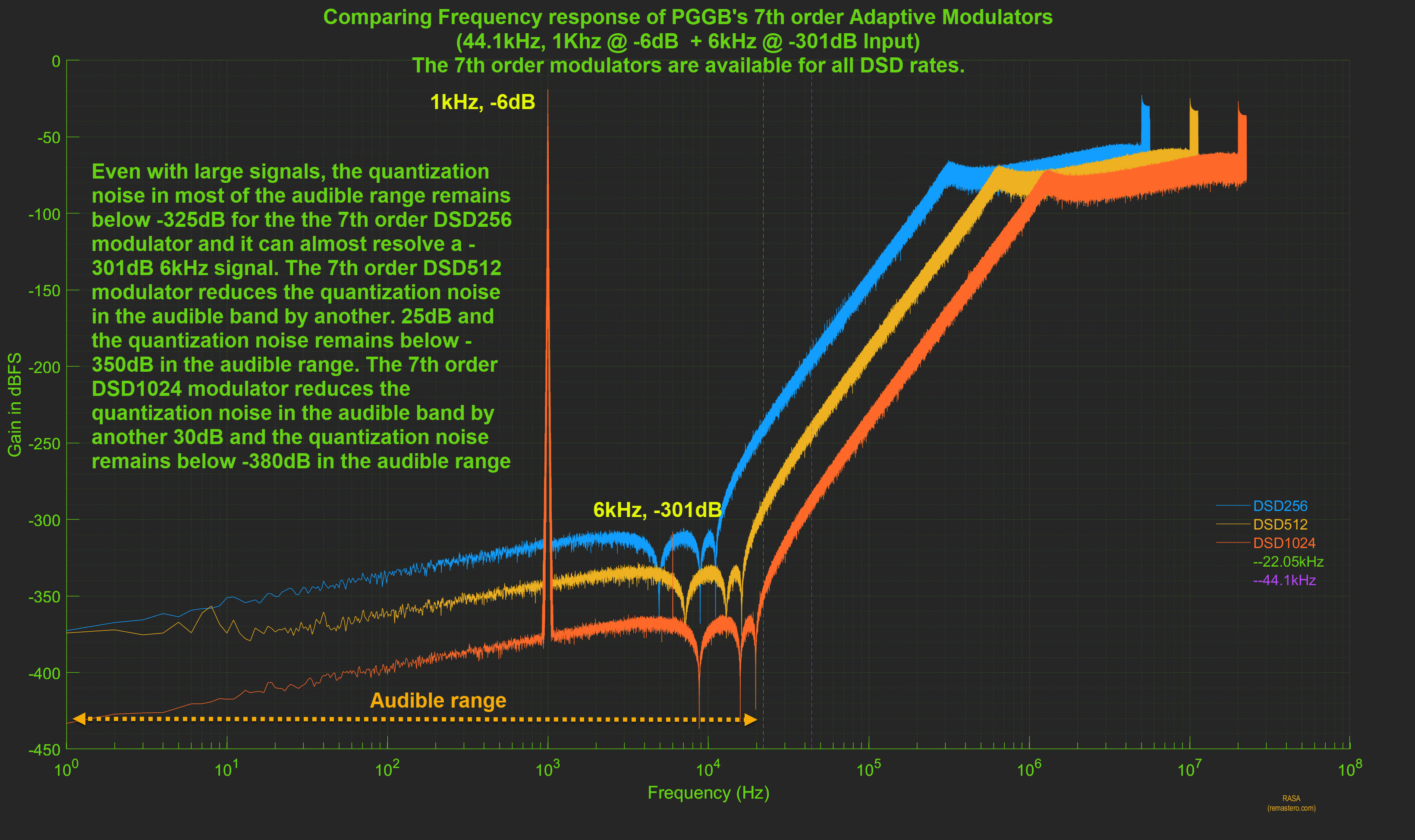
Large signal stability
While our focus is on designing noise shapers and modulators with small signal accuracy in mind, we take stability seriously. We make sure all our modulators, including the Very Low Noise and Ultra Low Noise groups, offer the same level of performance with signals near full scale. Below is an example of our 7th order modulator with a 1kHz signal at -6dB. You will see our modulator performance remains similar to what they are with small signals here.
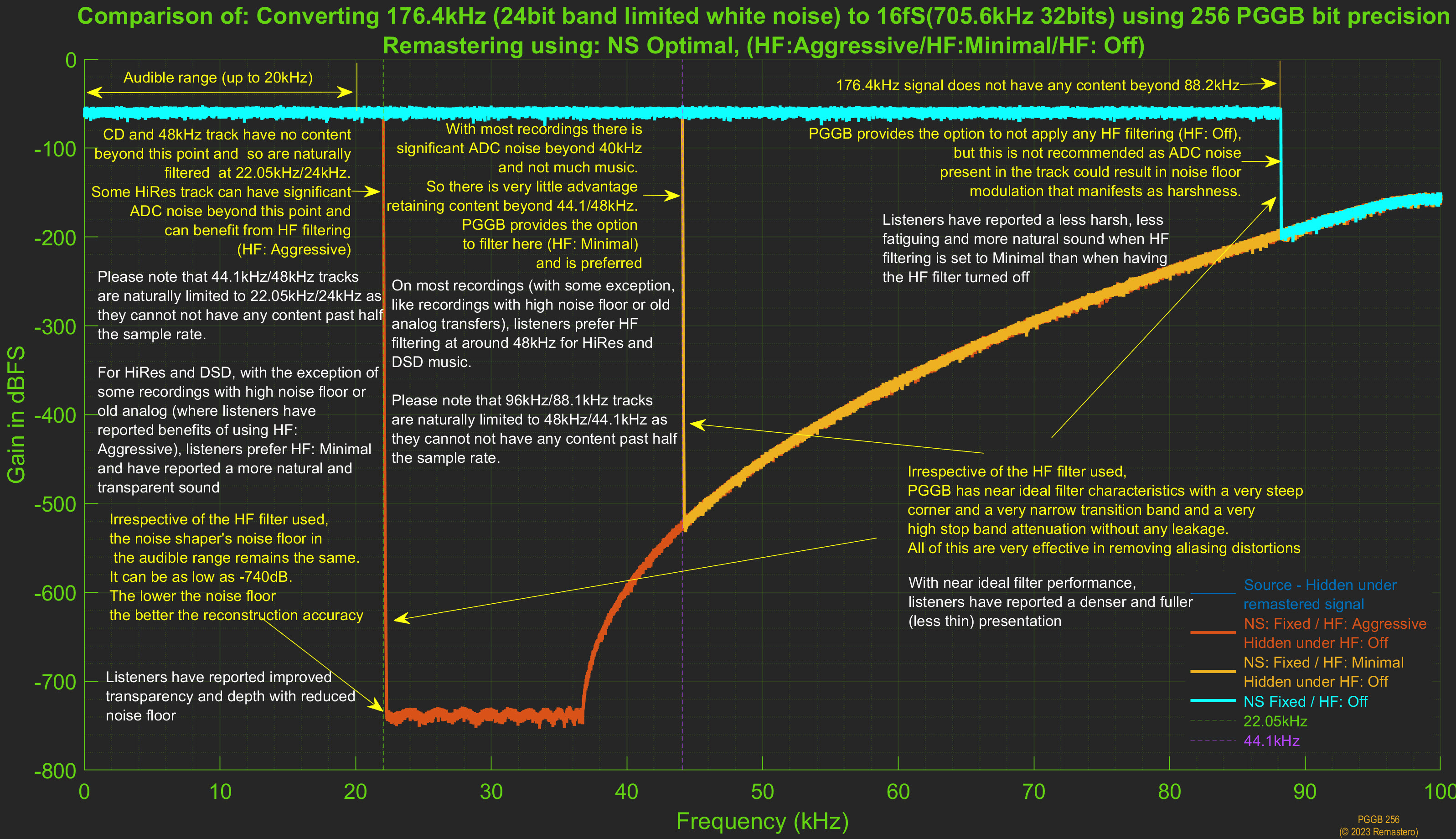
Plot Preview HF Filter Options.
Here is an annotated example comparing the different HF filtering options.
Inter-Sample-Overs.
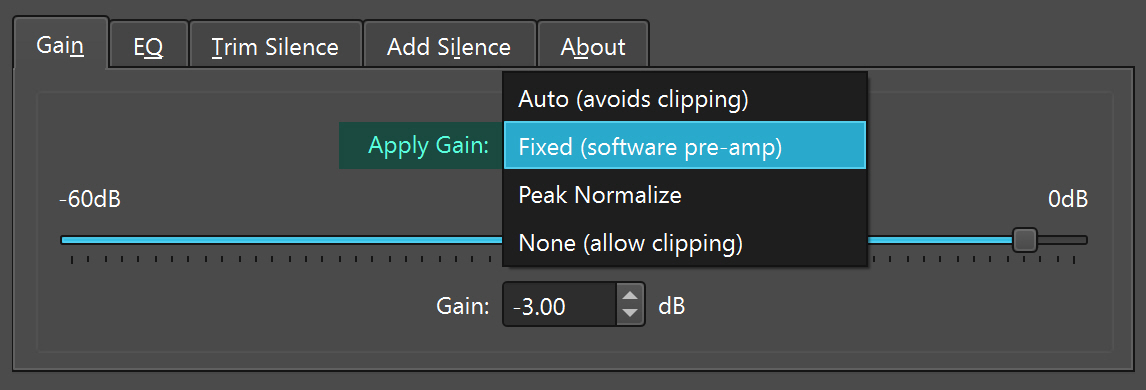
During reconstruction of the music signal after upsampling, the new samples can have values greater than 1.0, which are generally referred to as inter-sample-overs. Inter-sample overs will cause clipping and can be unpleasant. When gain is set to Auto as shown above, PGGB detects inter-sample overs and applies just enough attenuation to avoid clipping.
Deep Dives.
In-depth technical explorations for the curious audiophile, now on Zaphod’s Blog.
What affects reconstruction accuracy? ↗
Upsampling myths and half-truths ↗
Memory & Performance.
More on Memory and Speed (Why is PGGB so demanding?).
Everything in this section describes the Nyquist-Shannon engine, which is what PGGB used before V9 and what you still get if you select Legacy under Settings → Processing. With Precision optimized selected, as it is when you install PGGB, the Precision Optimized Upsampling Engine uses far less memory, paging is rarely needed, and speed comes down to how many cores your processor has. The worked example below is the demanding case rather than the usual one. Read about the PGGB engine ↗
Speed and memory: the trade-offs.
PGGB philosophy is to use all the information in the track to upsample to the final rate and do so at high precision. This comes at a cost, both memory and computation time. No shortcuts or cutting corners.
- Speed: To reduce computation time PGGB uses multi-core parallel processing and also hyper threading. So you directly benefit by having a CPU with multiple cores (almost linear relation with speed). You also benefit from having a high clock rate that is not thermally throttled, as the higher CPU clock also translates linearly to speed. I use a slightly over clocked AMD server that averages 4GHz with 24 cores (x2 hyper threaded). I use ALO cooling.
- Memory: Since PGGB uses all of the track, it needs to hold everything in memory till it is finally written to the output file, there re no shortcuts. We found any block processing (i.e., splitting and processing parts of a track) compromises SQ.
CPU requirements.
The CPU requirement is simple enough. Something to note, the modulators and noise shapers cannot be made parallel beyond a point, so while the upsampling benefits from more cores, modulator and noise shaper speedup stops beyond say 24 cores and CPU speed helps more. The time for modulation or noise shaping is about 40 - 50% of the total time for processing the track.
Memory requirements (worked example).
The memory requirement is best explained working backwards from the
output track. Say you wish to upsample your library to 512DSD, let
us say an average track in your library is 6 minutes long. A 6
minute DSD512 track is about 2GB in size. But each sample occupies
only a single bit in a DSD512 track. Before they were written to the
file, PGGB had these also stored in memory that required 2GB or
RAM.
The DSD modulator is responsible for converting PCM to DSD. It is
easier to think of DSD as 1-bit PCM but a very high rate PCM. So,
before it entered the DSD modulator, the 2GB DSD track was a PCM
track of the same 512fs rate (512 DSD is 512 x CD rate). But PCM is
not single bit, if we were doing computations with say 32 bit PCM,
before conversion to DSD, the 2GB DSD would have needed 32 x 2 =
64GB of RAM as each bit in DSD is now 32 PCM bits.
64bit floating point is the minimum a software upsampler should use,
so at the minimum the 2GB DSD track was 64bit PCM at the same rate,
which means it would have needed 128GB of memory! PGGB does not do
64bit for DSD, it does adaptive precision and the precision used is
typically 128bit. So the 2GB DSD512 was 2 x 128 = 256GB 128bit PCM
before it entered the modulator! That is how much memory you will
need to just to hold the high rate high precision PCM. But as you
may have guessed, it is simply not practical to expect 256GB of RAM
just to process 6 minutes of tracks to DSD512. By the way, if you
wanted to do DSD1024, then that doubles the size to 512GB.
How PGGB handles limited memory.
The way PGGB gets around this pesky memory issue is:
- It processes one channel at a time: the fastest processing is achieved when the entire track fits in available RAM. 256GB would be needed, for example, to process a 6 minute track at DSD512 in a single stage. If that much is available, then PGGB will process the entire track with both channels (left and right) processed simultaneously. If not, PGGB will then switch to processing just one channel at a time. Virtual memory will be used if there isn’t enough memory to hold one channel.
- It uses virtual memory: Virtual memory is your RAM + page files (or swap space in Mac/linux). When a OS does not have enough RAM, it borrows some space from the disk and treats it as extended RAM. Different OS have different ways of doing this. Windows provides users full control, you can go to settings and set the virtual memory and choose more than one internal disk and also set min and max for each of the disks. Then Windows will auto-magically just use free space on the disk when it needs more memory and creates page files that grows. Since these drives are for use as extended RAM, fast NVME drives are the best and there is some advantage in using more than one to distribute the load (but not necessary). It need not be the OS drive and it needs to have free space. Going back to the 2GB DSD512 example, it is ideal to have 128 GB RAM so that a single channel of an average track just fits in RAM and that will work fast, but when there needs to be more (say you do a DSD1024) or you are processing 12 minute track, then you need the page file to stop PGGB from running out of memory. In Mac, there is zero control, but PGGB implements a way to allow paging similar to what Windows does.
- Intelligent paging: Paging helps PGGB keep chugging along without running out of memory, but frequent disk access can really slow down processing as disk access is orders of magnitude slower than RAM, if not done properly, CPU utilization will drop and most of the time will be spent just reading from and writing to disk, when more than 50% of the required memory is not in RAM. We have implemented algorithms where PGGB always has what it needs close by in RAM and what it has done with or what it will need in future is in page file. The OS does the rest. As a result of this optimization, even though the RAM is much less than total required memory, paging does not affect performance much.
Summary: three processing scenarios.
In summary, when it comes to memory, more is better, but PGGB is designed to work with what you have. There are three scenarios as they relate to processing efficiency:
- Best: 2 channel mode - both channels are able to be processed simultaneously because there is enough RAM available to hold the entire track.
- Better: 1 channel mode - each channel is able to processed sequentially using only available RAM as there is enough RAM available to hold each channel.
- Good: 1 channel mode with virtual memory - PGGB borrows some space from the disk and combines it with available physical ram to increase the memory available to PGGB.
Virtual Memory (Windows only).
With the Precision Optimized Upsampling Engine, which is the default, paging is rarely needed and you can leave Windows to manage the page file. What follows matters if you select Legacy under Settings → Processing and use the legacy Nyquist-Shannon engine, where the whole track is held in memory. Read about the PGGB engine ↗
Recommended size.
It is best to set the virtual memory (both the initial size and the maximum size) to the same value and equal. 128 GB or more is recommended for PCM and 512GB or more for DSD. To know exactly how much free space you need, you can refer to the Calculating Free Space You Need section. Choose the fastest internal drive for setting the virtual memory. Make sure the drive has free space greater than the virtual memory size you set. For all other dries set 'No paging file'. Restart your PC once you have set the virtual memory. After restart, check if the drive you set virtual memory for has a 'pagefile.sys' file with the size close to the virtual memory size.
Disable memory compression.
On windows, disable memory compression. Open PowerShell as
administrator and enter command
Disable-MMAgent -mc
so Windows does not trigger compression and inflation while PGGB is
paging.
How to set virtual memory.
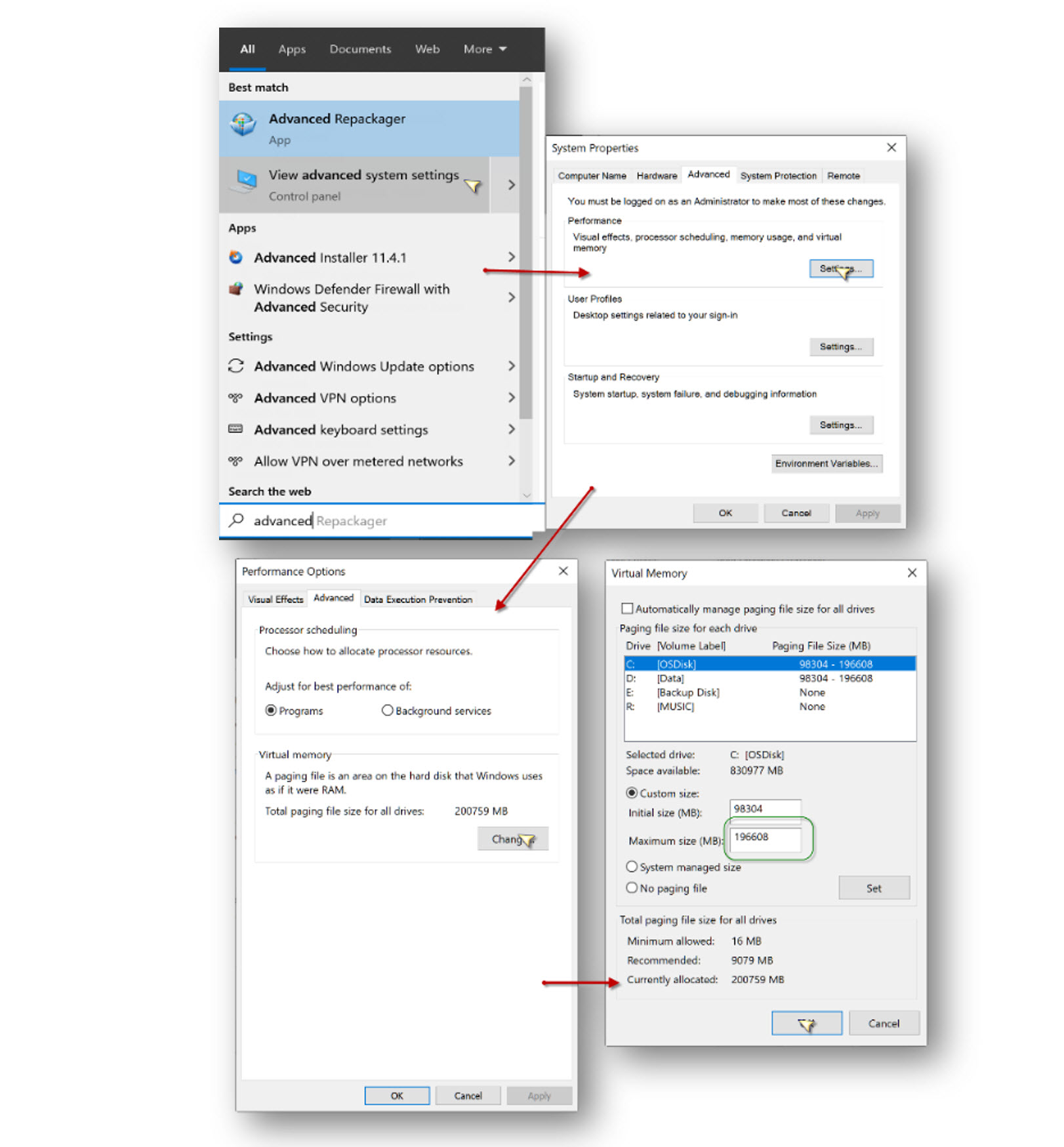
To set virtual memory, use the system property command-let. Go to start menu and start typing ‘advanced’ and select "View Advanced System Settings." Then click Advanced-> Performance Settings. This will open the Performance Options dialog. Click on Advanced tab, then click the ‘Change’ button under ‘Virtual memory’. Finally, in the Virtual memory dialog, uncheck ‘automatically manage paging file’ and enter a value greater than 128000 under Maximum size in Mb. Virtual memory availability and drives are system dependent. Below is just one example.
Page File (Mac only).
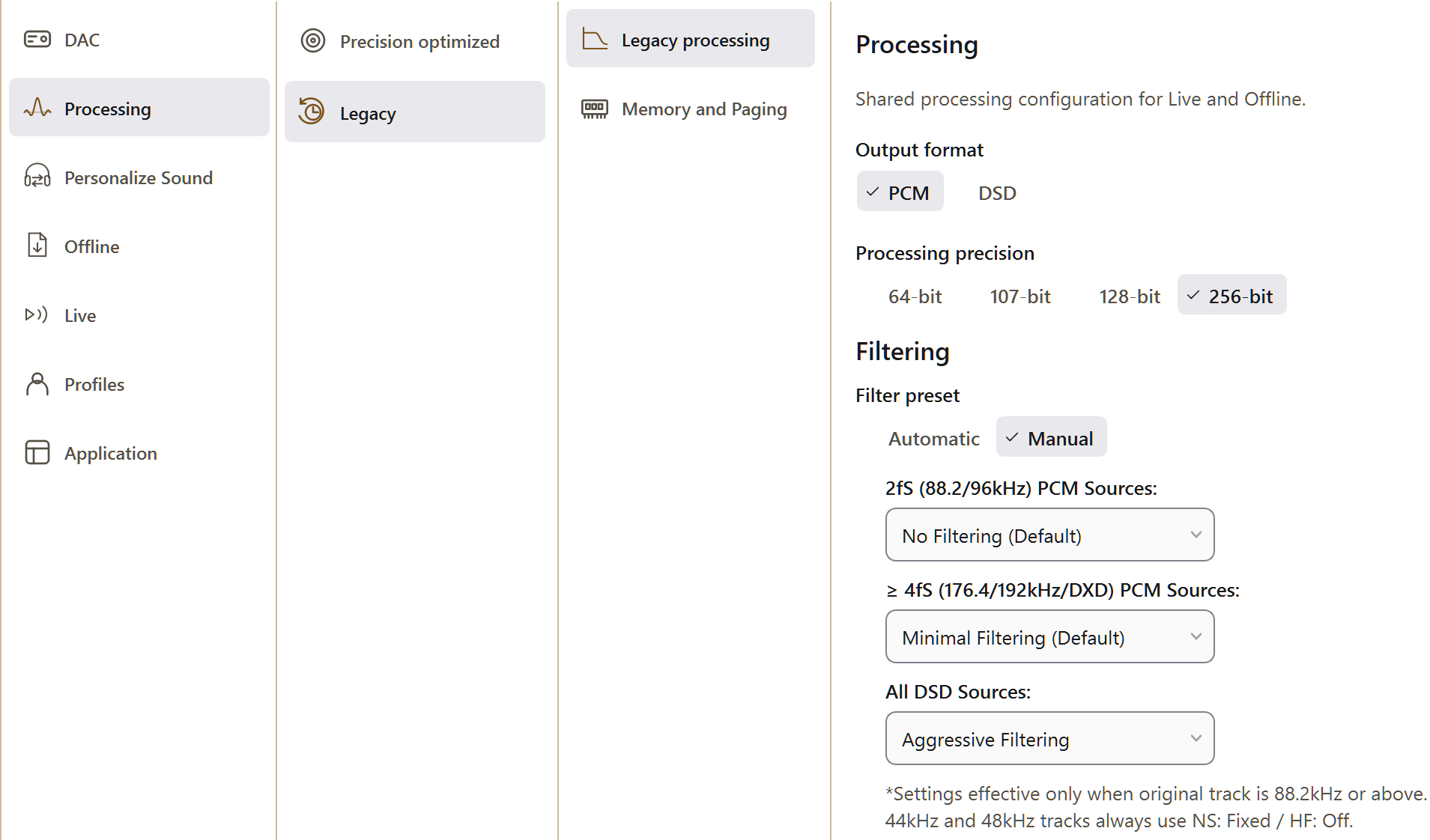
The paging controls are under Settings → Processing → Legacy → Memory and Paging, which PGGB disables while the Precision Optimized Upsampling Engine is in use. That is the default, and paging is rarely needed with it. What follows applies when you select Legacy under Settings → Processing and use the legacy Nyquist-Shannon engine, where the whole track is held in memory. Read about the PGGB engine ↗
Setup and recommended size.
There is now an option for Mac to allow creation of page files, once this option checkbox is selected, you can browse to the folder where you want the page files. 128 GB or more free space is recommended for PCM and 512GB or more for DSD. To know exactly how much free space you need, you can refer to the Calculating Free Space You Need section. This option provides you with more control over paging when you do not have enough RAM. On a Mac, you are not limited to the internal drive, a fast NVME Thunderbolt external drive is also an option (or use Thunderbolt enclosures such as this or this). You can now choose up to two paging locations, it is important that both are on different drives and they are fast NVME drives. If you want to know more about why PGGB is so demanding, please refer to the section on memory and speed.
Optimize PCM Paging.
If you check the 'Optimize PCM Paging', it will let you process longer tracks without hitting RAM limit. If the processing won't fit fully in memory, then PGGB will process one channel at a time, to anticipate any possible clipping, PGGB reduces gain preemptively by 1dB. If you are concerned that the gain may change on a long movement that was split into tracks, we suggest setting a fixed negative gain of 1dB or more. Checking 'Reduce NVME Contention' allows PGGB to reduce NVME contention and improves speed when paging.
Control when paging starts.
You can control when paging starts by setting the swappiness value using 'swappiness.txt' file. The swappiness value is a number between 0 and 100 that tells PGGB when to start paging, as opposed to using RAM. Swappiness values of 0 or 1 will make PGGB to start paging immediately, while a swappiness value of 100 will make PGGB to try to use RAM as much as possible. The default swappiness value is 50, i.e., PGGB will start paging when the memory it needs exceeds 50% of RAM. You can change the swappiness value by creating a file named 'swappiness.txt' in the same folder as the first page file location. The file should contain a single number between 0 and 100. If the file is not present, the default value of 50 will be used. Set the value to 20 if you find PGGB stops processing even though you have enough RAM space for paging. You can use the sample file we have here . Smaller swappiness values will make PGGB to start paging sooner, reduce memory pressure and improve stability, but it will also slow down the processing because less RAM is used. Larger swappiness values will allow PGGB to use more RAM and less paging, it will be faster, but it may cause the OS to stop PGGB from completing the processing.
Note: By default, if you hit the browse button it should go to your HomeFolder/PGGB/cache
Calculating Free Space You Need for Paging/Virtual Memory.
Please use the calculator below to find out the maximum free space you will need (for paging on Mac and virtual memory on Windows) to be able to remaster to PCM or DSD based on the upsampling factor.
These figures are for the legacy Nyquist-Shannon engine. With the Precision Optimized Upsampling Engine, which is the default, memory use does not grow with the length of a track and you are unlikely to need paging at all. Read about the PGGB engine ↗
Calculate Free Space Needed.
Calculating Storage Space You Need For Your PGGB Albums.
Use the calculator below to find out how much storage space you will need for your albums after converting them using PGGB.
PGGB Library Storage Space Calculator.
So long and thanks for all the fish
.·´¯·.´¯·.¸.ZB.´¯·.¸¸.·´¯·.¸><(((º>