PGGB Offline Remastering
High-precision audio upsampling and downsampling with algorithms optimized to maximize reconstruction accuracy to near theoretical limits. Up to 256-bit precision. PCM and DSD.
Free 30-day trial — converts to a free perpetual Lite license.
The Why, When, How and Which of PGGB
-
Why PGGB? The premise of software upsampling using PGGB is to offload some or most of the processing a DAC does, and do it
better ahead of time, due to:
- More computing resources available to PGGB
- Better reconstruction accuracy due to the advanced algorithms implemented in PGGB
- Better small signal accuracy due to better noise shaper and modulators available in PGGB
-
When is PGGB right for my DAC? Not all DACs will benefit equally. Good candidates bypass their internal processing:
- PCM NOS: R2R DACs in NOS mode or DACs whose oversampling filter can be turned off
- Pure DSD: DSD DACs with a pure DSD mode
- High-rate PCM and DSD: DACs supporting 705.6/768kHz+ or DSD256+
- See the full compatible DAC list or post on the AS forum
-
PCM or DSD?
- Your DAC has a pure 1-bit DSD path: Choose the highest DSD rate it supports
- Sigma-delta DAC without pure DSD: Choose the highest DSD rate supported
- PCM/R2R DAC that decimates DSD to low-rate PCM: Choose the highest PCM rate supported
-
Which settings? PGGB is already tuned for optimal results. Three main considerations:
- Your DAC: For DSD, choose the highest rate your DAC supports. For PCM, choose the highest rate and bit depth. Use built-in DAC presets when available. Set the highest precision your license allows.
- Your System:
- Memory: PGGB is memory intensive — set up page file on Mac or virtual memory on Windows. Enable memory optimization for PCM. See the disk space calculator.
- Speed: For DSD, if single-stage is too slow, use two-stage conversion. On windows, disable memory compression. Open PowerShell as administrator and enter command Disable-MMAgent -mc so Windows does not trigger compression and inflation while PGGB is paging.
- Storage: Use the storage space calculator.
- Your Player: Disable all DSP, sample rate conversion, EQ, and volume control.
- Roon: Does not support DSD rates above DSD512 or PCM above 768kHz. Set output to 44.1kHz rates for DSD.
- HQPlayer: Set 1x/Nx Filter and Dither to None. For DSD, set DirectSDM and enable 48k DSD under output.
- Volume: If using digital volume control, consider setting gain in PGGB instead.
Overview
Pan Galactic Gargle Blaster — Multiprecision PCM Plus DSD (PGGB Plus)
PGGB is an offline remastering tool for upsampling or downsampling audio files, with algorithms optimized to maximize reconstruction accuracy to near theoretical limits*. PGGB can apply EQ filters transparently. It transfers all common metadata tags and cover art to converted files. Output formats include .wav, .dsf, .wv (WavPack), or .flac. All PCM and DSD rates are supported.
The 'Plus' in PGGB Plus stands for 'PCM plus DSD, with up to 256 bits of precision'. PGGB implements high-precision computing for the entire processing pipeline including resampling, noise shaping, DSD modulators, and EQ. Choose from 64-bit (Normal), 107-bit double-double (Chill), 128-bit quad precision (Insane), or 256-bit octuple precision (Ludicrous). Higher precision results in better sound quality through improved reconstruction accuracy. Read more about the PGGB philosophy and DSD support.
PGGB uses a proprietary method different from conventional approaches. It is non-apodizing and does not use windowed sinc functions or long filters. PGGB considers the track as a whole. If no HF filters are enabled (default for CD and 2fS rates), PGGB keeps all original samples intact, then creates intermediate samples by time-shifting all original samples at once. This approaches the theoretical limit of reconstruction accuracy for a given track length and sample rate — more accurate than convolution using Whittaker-Shannon coefficients with windowing.
Windowed sinc-function convolution filters (used by real-time upsamplers) use fixed-length filters with accuracy limited to a time window of a few seconds. Accuracy increases with longer windows, but longer filters introduce their own challenges.
PGGB scales better with longer tracks and uses information from the entire track for reconstruction. As sample rate and track length increase, PGGB approaches mathematical equivalence of pure sinc-based interpolation. Higher reconstruction accuracy means more transparent sound: better depth and layering, improved resolution, cleaner leading edge, and more accurate timbre.
Simple to Use
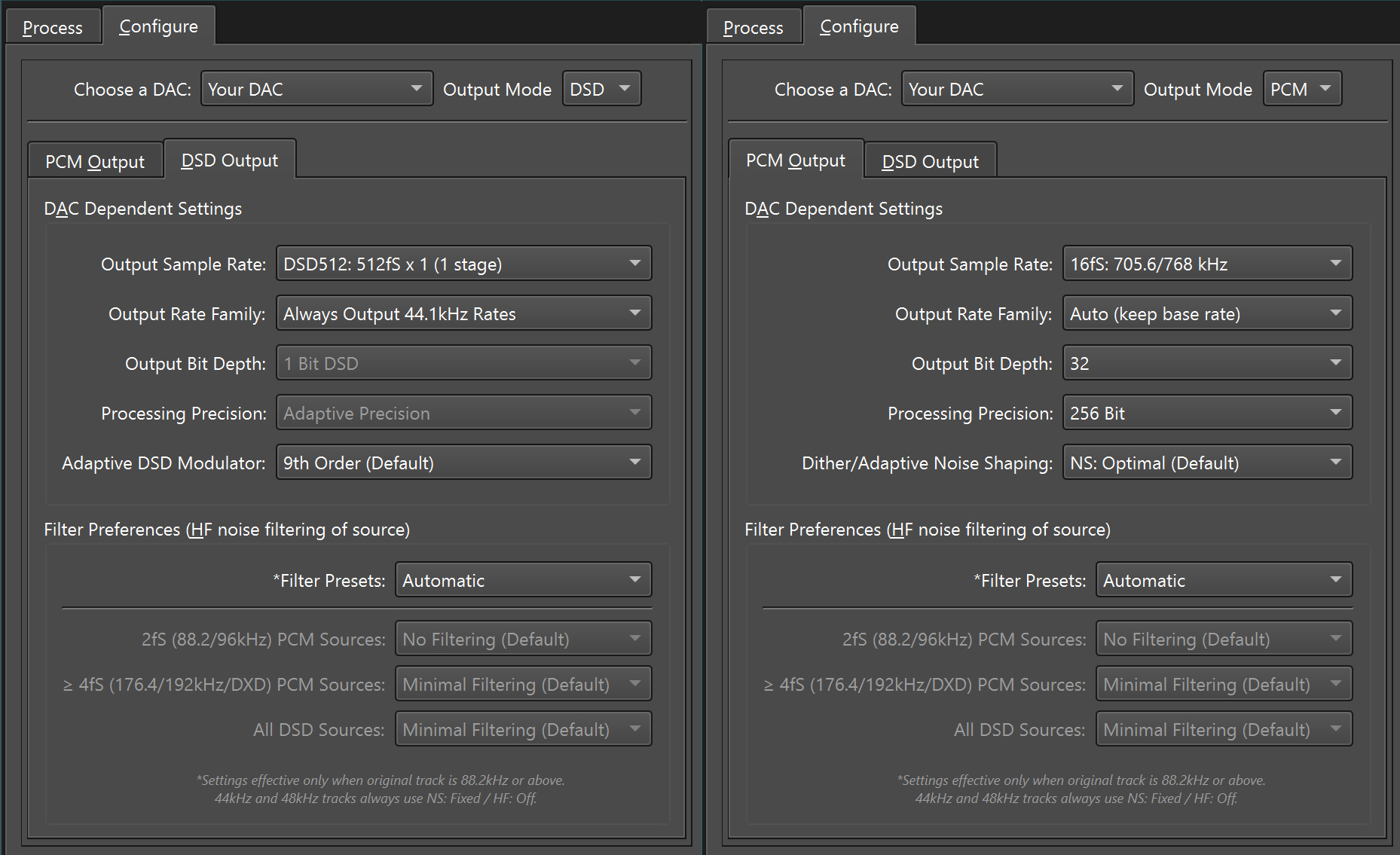
PGGB was designed for remastering your entire music library. Choose a DAC preset that matches your DAC, or manually set the maximum rate and bit depth your DAC supports. The defaults already provide great results.
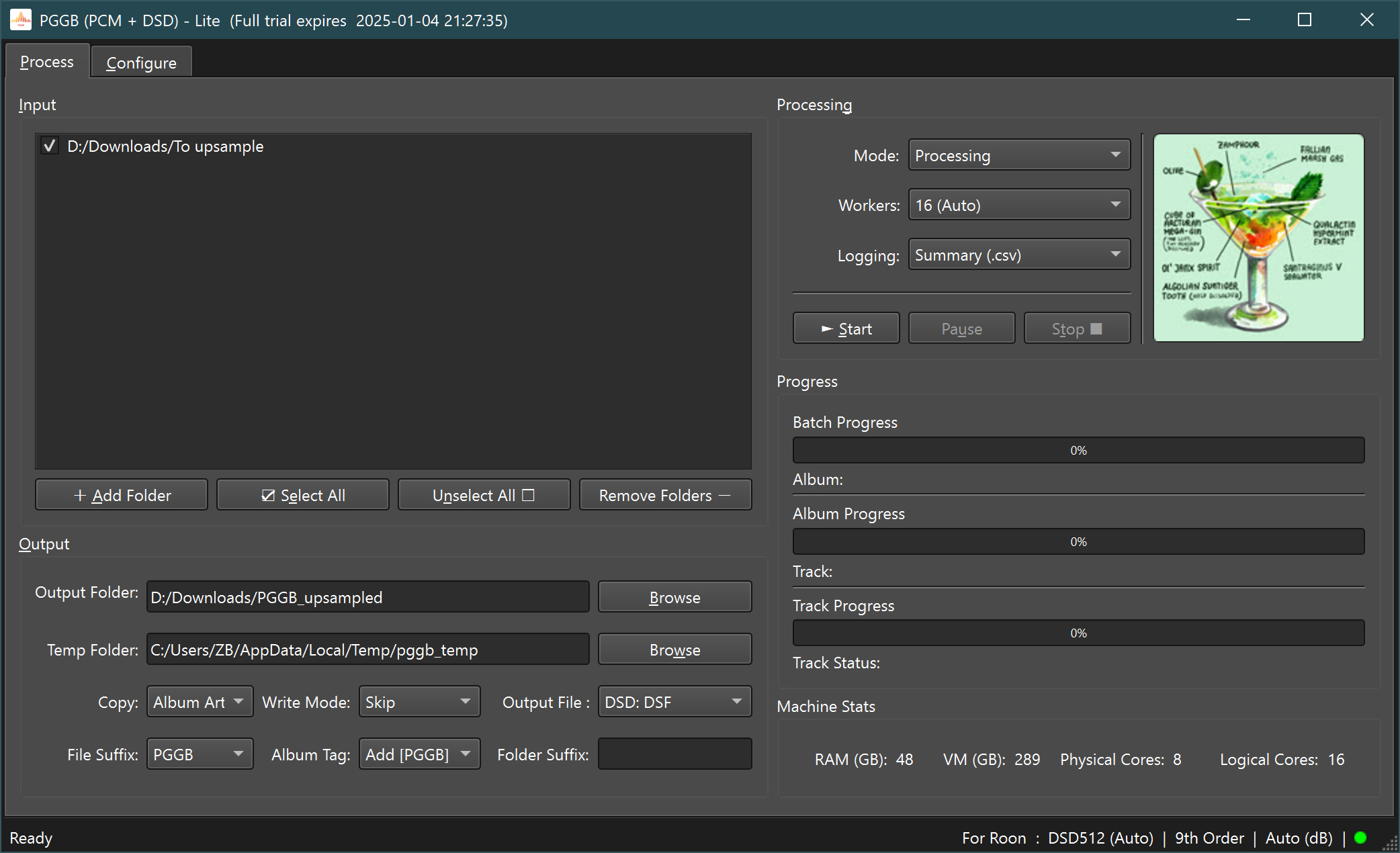
Point PGGB to your input and output folders (drag and drop supported), press 'Start', and PGGB begins processing. Use 'Pause' or 'Stop' as needed. You can add new folders during processing. Three modes: 'Create New' creates a new album folder, 'Skip' skips previously processed tracks, 'Overwrite' replaces existing tracks.
Customize to Suit Your Needs
PGGB uses proprietary algorithms customizable through an intuitive interface. The unique remastering technique preserves timing information while giving you control to tune results for your playback chain and listening preferences, PCM or DSD.
Specifications & Features
Below is a summary of PGGB's features. See the full guide or contact us with questions.
Input Formats
| File types | .wav, .flac, .aif, .aiff, .m4a, .dsf |
| Channels | Stereo (2-channel) |
| PCM rates | 44.1kHz to DXD |
| DSD rates | DSD64 to DSD2048 |
Output Formats
| PCM files | .wav, .wav (RF64), .wv, .flac |
| DSD files | .dsf or .wv (WavPack) |
| PCM rates | Up to 3.072MHz |
| DSD rates | Up to DSD2048 |
| Direction | Upsampling and downsampling |
| Bit depths | 12 to 32-bit fixed, 64-bit doubles |
High Precision
| 64-bit | Normal |
| 107-bit | Chill |
| 128-bit | Insane |
| 256-bit | Ludicrous |
Optimized math libraries developed with ADVANPIX
DSD Reconstruction Accuracy
Quantization noise in audible band
| DSD2048 | −300 to −800 dB |
| DSD1024 | −290 to −755 dB |
| DSD512 | −275 to −750 dB |
| DSD256 | −225 to −665 dB |
| DSD128 | −200 to −650 dB |
| DSD64 | −150 to −395 dB |
Range shown is from 5th to 25th order modulator. 6 orders available across 3 groups: Low Noise, Very Low Noise, Ultra Low Noise. Full comparison
PCM Reconstruction Accuracy
Quantization noise floor in audible band
| 256-bit | −740 dB |
| 128-bit | −540 dB |
| 107-bit | −500 dB |
| 64-bit | −360 dB |
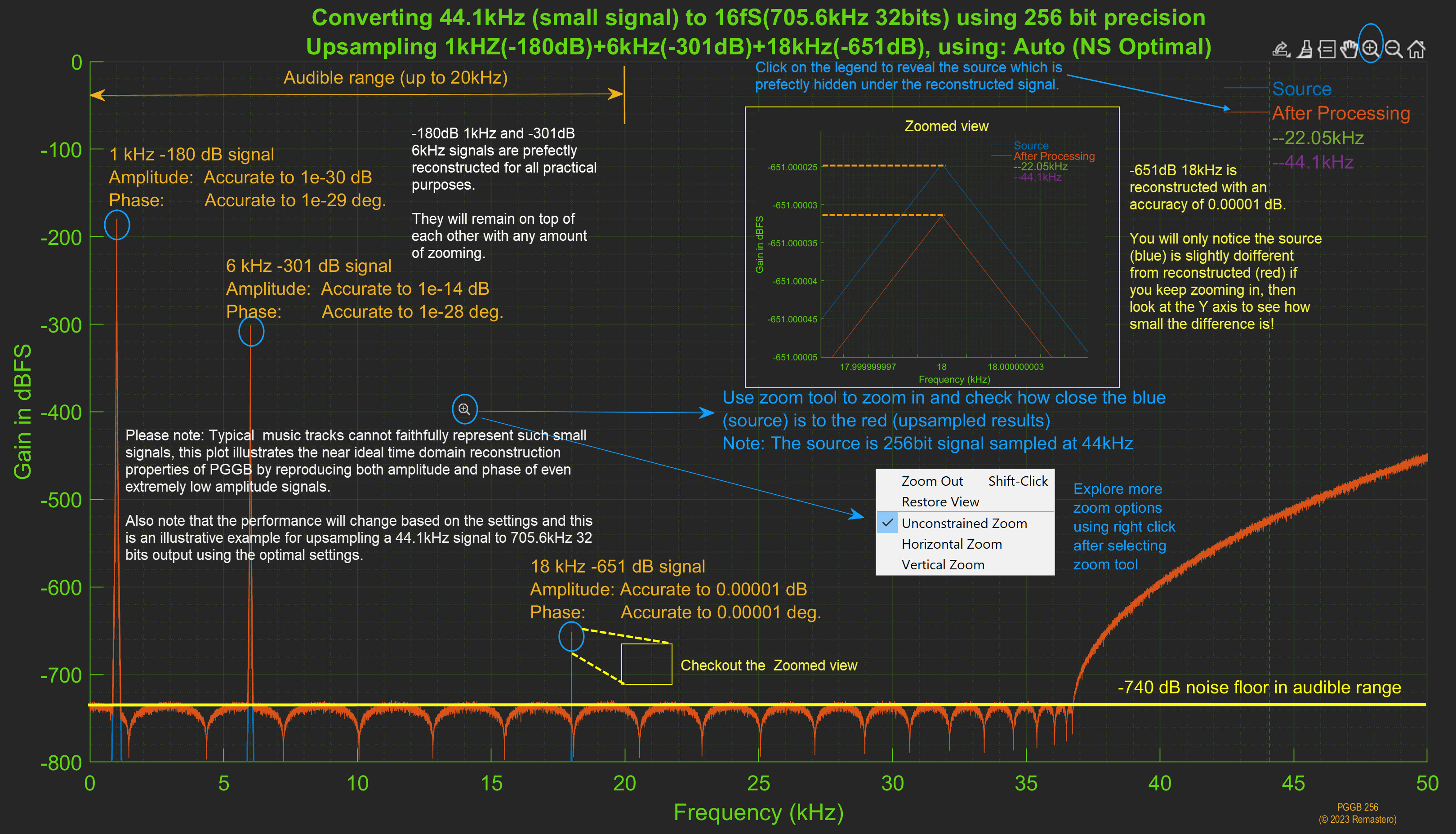
Small signal accuracy at 256-bit precision
| −301 dB signal | Amp 1e-14dB, Phase 1e-28deg |
| −651 dB signal | Amp 1e-5dB, Phase 1e-5deg |
Algorithms & Controls
- DSD or PCM resampling modes
- Same-rate or inter-rate family conversion
- Adaptive noise shaper and DSD modulators
- Adaptive per-track algorithm optimization
- Inter-sample over detection
- ReplayGain normalization
- Parametric & convolution EQ (107–256 bit)
- HF noise filters for ADC noise reduction
- Track trimming and silence adjustment
Other Features
- Built-in DAC presets for many popular DACs
- Real-time CPU and memory tracking
- Batch process albums in multiple folders
- Per-album .json settings
- Combine continuous recording tracks
- Full metadata and cover art transfer
- Multi-core parallel processing
- Dark and Light themes (follows system)
- Comprehensive tooltips and Shift+F1 help
- Plenty of HHGTTG references
System Requirements
For DAC and player requirements, see DACs & Players. For memory and speed details, see the guide.
PGGB requires a 64-bit Windows 10/11 PC or Mac (Mojave or higher). A minimum of 32GB RAM, 8-core processor, and 256GB of free space on a fast internal NVME drive is recommended. Actual requirements depend on your library, output sample rate, and desired efficiency.
- PCM conversions: For tracks under ~12 minutes, 16GB RAM and a 4-core processor may suffice for 128-bit precision, with a fast SSD (min 128GB) for paging. Requirements double for 256-bit. For batch conversion of 10s or 100s of albums: 8-core, 64GB RAM, 512GB free space.
- DSD conversions: Minimum 32GB RAM and 512GB free paging space for rates up to DSD512. Requirements double for DSD1024. For bulk conversion: 16-core, 128GB RAM, 1TB free space.
PGGB uses all processor cores when memory is available and CPU can reach max TDP. Ensure adequate cooling, especially if overclocked or in turbo mode. On Windows, if CPU utilization stays below 70%, run PGGB as administrator for higher priority.
PGGB can run on Linux via a Windows virtual machine with sufficient RAM and CPU cores allocated.
Note: PGGB requires Internet access during installation and for the trial version. On first run, PGGB may request firewall permission. We do not use or share your personal information.
DACs & Playback Software
Which DACs Benefit Most?
- High-rate PCM and DSD: DACs supporting 705.6/768kHz+ or DSD256+ benefit most from PGGB.
- PCM NOS: R2R DACs in NOS mode or DACs with oversampling filter bypass benefit significantly.
- Pure DSD: DACs with a pure DSD mode benefit significantly.
- DACs supporting up to DXD and DSD128: Remastering CD quality to DXD (352.8kHz) or DSD128 is beneficial.
- PCM-only DACs: Use PGGB to remaster DSD to the highest supported PCM rate.
- 96kHz/192kHz DACs: Use PGGB to remaster DSD or DXD to supported rates.
User-Reported Compatible DACs
- Chord DAVE, Hugo TT2, Qutest, Hugo2, Mojo, Mojo 2 (16fS*/32-bit or 24-bit via DBNC/SRC.DX). Some users prefer DAVE with DSD+ filter and DSD512.
- T+A SD 3100 HV, SDV 3100 HV, DAC 200 (DSD512, DSD1024 or 16fS/32-bit with NOS2)
- Denafrips Terminator-Plus, Terminator (DSD512, DSD1024 or 32fS/20-bit**)
- Holo Audio May DAC, Spring 3 (up to DSD2048 or 16fS/20-bit** or 32fS/16-bit***)
- MSB Select/Reference with Pro ISL (DSD256, DSD512 or 16fS/32-bit) and Digital Director
- Vinnie Rossie L2 DAC in NOS mode (DSD512 or 16fS/32-bit)
- iFi Pro iDSD (DSD512, 16fS/32-bit)
- dCS DACs (DSD128, 8fS/24-bit)
- Gustard X26 Pro ESS 9038 Pro NOS (DSD512, 16fS/32-bit)
- Ayre QX-5 Twenty USB2 (DSD256, DSD512, 16fS/32-bit)
- Topping D90, D50 (DSD512, 16fS/32-bit)
- Playback Designs MPD-8, MPS-8 (DSD256)
Expected to benefit (feedback welcome):
- Denafrips Ares II, Pontus II, Venus II (DSD512, DSD1024, 32fS/20-bit**)
* FS = Fundamental Sample rate. 16fS = 16 x 44.1kHz or 16 x 48kHz.
** 19 or 20 bits is where the DAC is most linear.
*** USB driver may limit playback to 16 bits at 32fS rates.
Playback Software & Servers
Set your playback software to bit-perfect mode — no volume control, dither, bit depth conversion, or other DSP.
- XDMS and Roon for Taiko SGM Extreme (enable XDMS mode in PGGB hidden menu)
- Innuos Server: Up to DSD512 and 16fS PCM with Sense and Roon
- Antipodes: Up to 16fS and DSD512 with Squeeze, HQPlayer, Roon, MPD
- HQPlayer Desktop/Embedded: Set 1x/Nx filter to 'None', dither 'None', volume 0dB. For DSD: DirectSDM, enable 48k DSD
- Roon: Disable Headroom, sample rate conversion, and DSP. Fixed volume. Does not support 48k DSD rates — set PGGB to always output 44.1kHz DSD
- Chord Poly: Up to 8fS with Roon, 16fS with MPD from SD card
- JRiver Media Center
- Audirvana: Up to DSD512 and 16fS PCM
Software Volume Control
If your DAC lacks volume control or you prefer software volume:
- Best: Set PGGB to output 64-bit (larger files). Use software volume and output at desired bit depth. Enable noise shaping or dither in your player.
- Alternate: Enable noise shaping in PGGB, output 32-bit. Use software volume and output at desired bit depth with noise shaping or dither.
Licensing & Pricing
PGGB requires a license for Plus and Max tiers. Licenses are tied to your PC/Mac Hardware ID. To purchase, use the buy button below, then email zb.pggb@gmail.com with your name (or company name), email address, and your Hardware ID. To find your Hardware ID, see instructions below.
Without a valid license, PGGB runs in trial mode for 30 days then converts to Lite. Contact us if you have trouble running PGGB or need to extend your trial.
Compare Tiers at a Glance
|
Limited Trial
Free
|
Lite
Free
|
Plus
$350
|
Pro
$650
|
Max
$1050
|
|
|---|---|---|---|---|---|
| PCM up to 107-bit | Unlimited | Unlimited | Unlimited | Unlimited | Unlimited |
| PCM 128-bit | 2 tracks | Unlimited | Unlimited | Unlimited | |
| PCM 256-bit | 2 tracks | 2 tracks | Unlimited | Unlimited | |
| DSD64–DSD256 | 2 tracks | Unlimited | Unlimited | Unlimited | |
| DSD512–DSD2048 | 2 tracks | 2 tracks | 2 tracks | Unlimited | |
| EQ filters (PGGB-EQ) | |||||
| Installs | PC/Mac | PC/Mac | 1 PC/Mac | 1 PC/Mac | 1 PC/Mac |
| License validity | 30 days | Perpetual | Perpetual | Perpetual | Perpetual |
| Support | Forum/Email | Forum | Forum/Email | Forum/Email | Forum/Email |
| Free upgrades | — | — | 1 year* | 1 year* | 1 year* |
| Commercial use | |||||
| Download | Automatic | Buy $350 | Buy $650 | Buy $1050 |
* If no major updates within first year, free upgrade until next major version.
Why Upgrade to V8?
| Feature |
V7
|
V8
New
|
|---|---|---|
| Platform support | Windows, Intel Mac, Apple Silicon (Rosetta) | Windows, Intel Mac, Apple Silicon (native) |
| Speed enhancements (PCM, DSD) | — | Hardware accelerated pipeline |
| Apple Silicon performance | Rosetta (emulated) | Native — 5–10x faster |
| PCM 256-bit speed | Baseline | 3–4x faster, uses 25% less RAM |
| DSD speed | Baseline | 10–30% improvement |
| Quality improvements (DSD) | — | New modulators improve reconstruction accuracy |
| DSD modulators | 5th–9th order* | 5th–25th order, for all rates |
| Quantization noise** | −400dB to −500dB | −600dB to −800dB |
| DSD rates | DSD128–DSD2048 | DSD64–DSD2048 |
| Upgrade Now |
Buy
| License | Cost | Action |
|---|---|---|
| Free Trial | Free, converts to Perpetual (Lite) after 30 days | Free |
| Upgrades | For upgrades from earlier versions (older than v7) to v8, a new license is required | Email us for options |
| Personal |
|
|
| Commercial | Contact Us | Contact Us |
All sales are final, no refunds once a license has been generated. Please use the trial to fully evaluate PGGB before purchasing.
Find Your Hardware ID
PGGB requires a license for Max and Plus tiers, tied to your Hardware ID. After installing PGGB, go to the Configure Tab → About tab. Click the 'Hardware ID' link to copy it to your clipboard, then paste it in your email to us.
You do not need a license for Trial/Lite. The trial starts automatically and converts to Lite after 30 days.
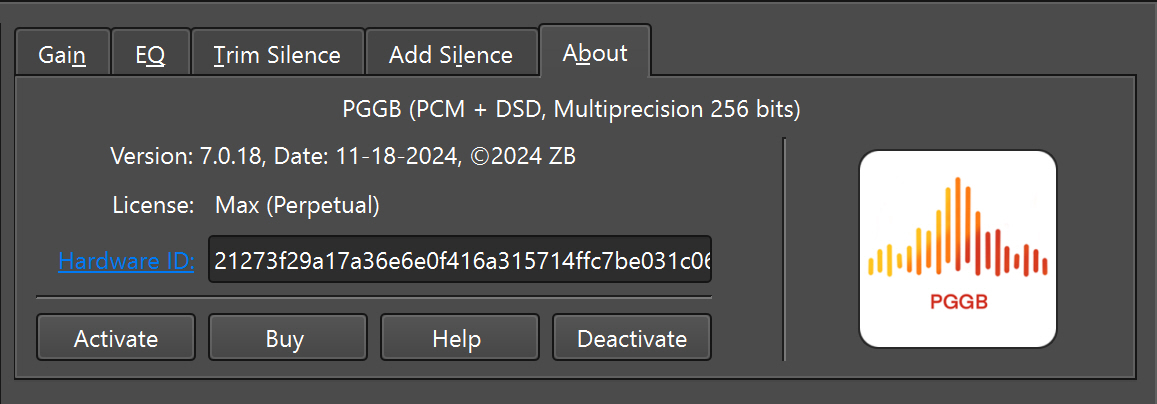
Once you receive a license file, use the 'Activate' button to browse to it. The license displays its duration and type. The Hardware ID is tied to your specific PC/Mac. Licenses are non-transferable. When your Hardware ID changes, you may request a new license. To move PGGB to a different machine, deactivate your current license first and provide the deactivation code.
Downloads & Installation
Note: These are Dropbox links. If you don't see a download option, click '...' to find it.
Windows: Download and run the installer. If you agree to the End User License Agreement, follow the installation wizard.
Mac: Open the .dmg file, read the EULA. If you agree, drag PGGB.app to your Applications folder.
On Mac, if you get a message that the app is not from the App Store, go to System Preferences → Security & Privacy → click 'Open Anyway'.
So long and thanks for all the fish
.·´¯·.´¯·.¸.ZB.´¯·.¸¸.·´¯·.¸><(((º>